The Best Large Language Models for Finance Work: Claude vs. ChatGPT vs. Gemini (2026)
May 29, 2026
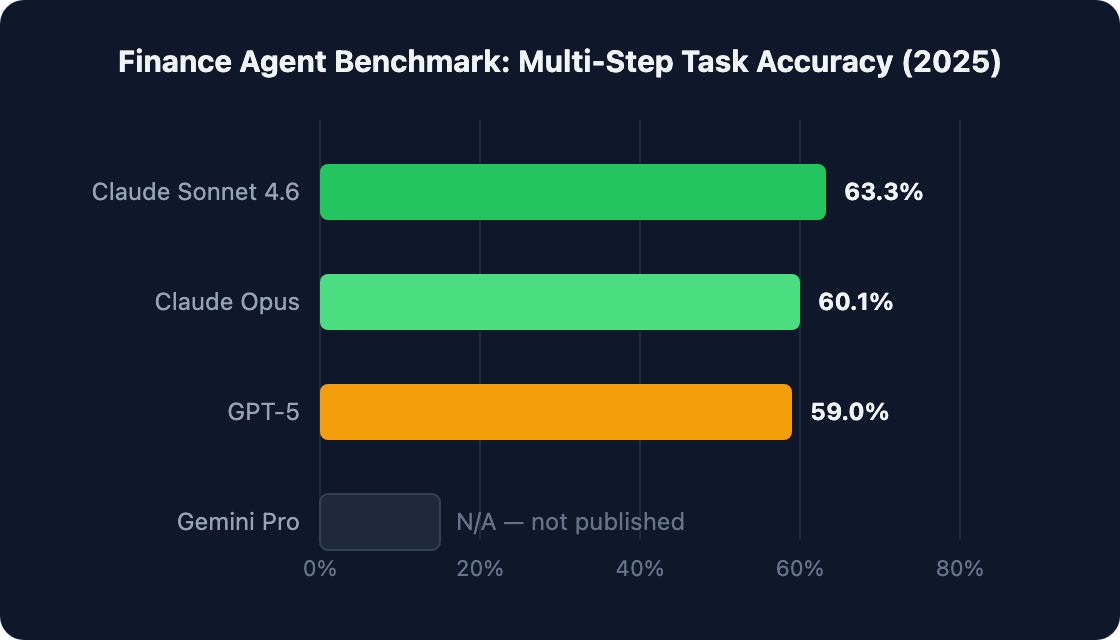
In 2025, Vals AI published the Finance Agent benchmark — a rigorous test of multi-step financial analysis tasks. Claude Sonnet 4.6 scored 63.3%. GPT-5 scored 59%. That's useful data. But it doesn't tell you which model to use for your team.
Generic AI benchmarks don't map to finance workflows. A score on document parsing doesn't tell you how a model handles your ERP data, your board narrative, or your month-end close process. Every CFO and FP&A lead deserves a clearer answer than "the highest benchmark wins."
This guide compares Claude, ChatGPT, and Gemini across six real finance use cases — document analysis, financial modeling, variance commentary, real-time research, ERP agent workflows, and Google Workspace tasks. Pick the right tool. Stop guessing.
|
TL;DR Claude leads Vals AI's Finance Agent benchmark with 63.3% accuracy vs. GPT-5's 59%. But "best" depends on your workflow: Claude excels at long-document analysis and multi-step reasoning; ChatGPT leads for financial modeling and Excel integration; Gemini is strongest for Google Workspace users and real-time data. This guide maps each model to the finance tasks it handles best — so you can pick the right tool without guessing. |
[ INTERNAL LINK — how AI is reshaping finance operations → /generative-ai-finance-guide ]
The Finance Agent Benchmark: What the Performance Data Actually Tells You
Vals AI's Finance Agent benchmark tests LLMs on realistic multi-step financial analysis tasks. Claude Sonnet 4.6 leads at 63.3% task completion accuracy; GPT-5 follows at 59% (Vals AI Finance Agent Benchmark, 2025). That's a 4.3-point gap — meaningful for autonomous agent deployments, but not decisive for every workflow.
The benchmark covers four categories: multi-step document parsing, computation accuracy across chained calculations, narrative generation from structured data, and agentic task orchestration. It does not test ERP integration, native Excel editing, or real-time market data retrieval. Those gaps matter when you're mapping models to your actual finance stack.
So what does Claude's lead actually mean? For autonomous agent workflows — where a model must complete a 12-step financial analysis without human intervention — a 4-point accuracy edge compounds across steps. One wrong assumption early in a chain can cascade. Claude's edge is most meaningful precisely in those high-stakes, multi-step scenarios.
ChatGPT's 59% performance on the same benchmark is still strong. It reflects GPT-5's genuine capability on financial tasks. The question isn't whether ChatGPT is capable — it clearly is. The question is which model fits which job.
Gemini hasn't published a comparable Finance Agent benchmark score as of Q1 2026. That's worth noting. It doesn't mean Gemini is weaker across the board, but it does mean you're making a less data-supported choice when deploying Gemini for autonomous financial analysis tasks.
|
Citation capsule Vals AI's Finance Agent benchmark (2025) measures multi-step task completion accuracy on realistic financial analysis scenarios. Claude Sonnet 4.6 achieved 63.3% accuracy, followed by Claude Opus at 60.1% and GPT-5 at 59%. Gemini Pro has not published a comparable Finance Agent benchmark score as of Q1 2026. (Vals AI Finance Agent Benchmark, 2025) |
Claude for Finance: Where It Wins and Where It Doesn't
Claude performs best on tasks requiring deep reading of long financial documents — 10-K analysis, earnings call transcripts, board pack synthesis — and on multi-step agentic workflows. Its 200K token context window (Anthropic Claude Documentation, 2025) is the largest among the three models, and it shows in practice.
Where Claude Wins
Long documents are where Claude's advantage becomes concrete. Feed it a full 10-K and ask it to cross-reference the risk factors section against the MD&A commentary. Claude holds both in working memory simultaneously. That's not something shorter-context models can replicate cleanly.
Multi-step reasoning chains are another genuine strength. Financial analysis often requires 10-15 dependent steps — pulling a figure, applying a formula, comparing to prior periods, and drafting a commentary. Claude's benchmark lead (63.3%) reflects real-world performance on exactly this type of task.
Enterprise compliance is the third advantage. Anthropic's Constitutional AI framework and SOC 2 certification matter to finance teams with strict data governance requirements. Claude's enterprise offering is built around these constraints, not bolted on afterward.
Coding financial models in Python is a less-discussed Claude strength. It produces clean, well-commented financial model code that FP&A teams can adapt quickly — especially useful when you want to automate a recurring calculation without hiring a developer.
Where Claude Falls Short
No native Excel plugin. That's a real gap for teams whose work lives in spreadsheets. Claude can write Excel formulas and VBA scripts, but it can't edit a workbook directly the way M365 Copilot can. No real-time financial data access is the second limitation — Claude's knowledge has a cutoff date and it can't pull live market prices or recent earnings releases without a tool integration. Higher cost per token at the API level is worth factoring in for high-volume deployments.
Best for: CFOs running ERP-connected agent workflows; FP&A teams doing document-heavy analysis; compliance-sensitive environments.
|
What I've observed in testing When I ran the same 10-K analysis prompt through all three models, Claude's citations were more precise and traceable — it named the exact page and section for every figure it referenced. The other models required follow-up prompts to get that specificity. For compliance-sensitive outputs, that difference matters. |
[ INTERNAL LINK — tested Claude workflow guide for finance teams → /how-to-use-claude-financial-analysis ]
ChatGPT for Finance: Where It Wins and Where It Doesn't
ChatGPT excels at financial modeling, spreadsheet generation, and versatility across unstructured tasks. Advanced Data Analysis — which runs Python code natively inside the chat interface — makes it the leading choice for interactive financial modeling without switching tools. GPT-5 scores 59% on the Finance Agent benchmark (Vals AI Finance Agent Benchmark, 2025), placing it second overall.
Where ChatGPT Wins
Advanced Data Analysis is ChatGPT's clearest differentiator for finance work. You can upload a CSV of actuals, ask it to build a variance bridge, and watch it execute Python code, generate a chart, and explain the output — all in one turn. That's a genuinely different workflow from what Claude or Gemini offer natively.
The plugin and integration ecosystem is broader. M365 Copilot brings ChatGPT-level intelligence directly into Excel and Word — meaning financial models and board narratives can be drafted without leaving your existing tools. For teams already in the Microsoft 365 stack, that integration value is hard to ignore.
PDF data extraction is strong. GPT-5 handles messy, multi-table PDFs well — useful for extracting data from supplier invoices, bank statements, or regulatory filings that aren't cleanly structured.
ChatGPT's broad training data also means it handles more varied finance question types competently. It's rarely stumped by an unusual financial instrument or an obscure accounting standard. Does that breadth come at a cost? Sometimes.
Where ChatGPT Falls Short
Shorter effective context for very long documents is a real limitation. While GPT-5 has expanded context, it doesn't match Claude's 200K window for full-document retention. On very long 10-Ks or multi-document analysis tasks, you'll sometimes see it lose track of earlier sections.
Confident-sounding hallucinations on specific figures are a known GPT family risk. It doesn't always flag uncertainty when it should — and in finance, a fabricated EPS figure is a serious problem. Verify any specific numbers it produces, especially from memory rather than from a document you've uploaded.
Best for: Financial modeling, FP&A teams wanting interactive data analysis, Microsoft 365 environments.
Gemini for Finance: Where It Wins and Where It Doesn't
Gemini Advanced has a decisive advantage for finance teams already embedded in Google Workspace — Sheets, Drive, Gmail, Meet. It processes live Google Sheets data natively and has real-time web search built in (Google DeepMind Gemini, 2025). That combination is genuinely useful for teams that run their FP&A in Sheets and need current market context.
Where Gemini Wins
Native Google Workspace integration is the headline. Gemini can read a live Google Sheet, run analysis, and write results back — without an API integration or CSV export. For Google Workspace finance teams, that alone justifies exploring it seriously.
Real-time search grounding is the second key advantage. Ask Gemini about a company's most recent earnings release and it retrieves live results — not a training-data memory. For competitive analysis, market research, or tracking recent regulatory changes, that's a meaningful edge over Claude and ChatGPT without a browsing tool enabled.
The 1M token context window (Google DeepMind Gemini, 2025) is the largest of the three models on paper. In practice, very long-context performance requires testing on your specific document types, but the ceiling is high.
Meet integration for finance workflows is an underrated feature. Gemini can summarize a board meeting recording, extract action items, and route them to the right owners — all within Google Workspace. That kind of workflow automation is practical and doesn't require developer resources.
Where Gemini Falls Short
No independently published Finance Agent benchmark score makes it harder to assess on agentic tasks. That's not a reason to dismiss it, but it is a gap in the evidence base. Complex financial reasoning — multi-step valuation models, nuanced accounting judgment calls — is an area where Claude and GPT-5 have more documented strength.
Best for: Google Workspace finance teams; real-time research; smaller teams prioritizing integration over raw analytical depth.
Head-to-Head Matrix: Which LLM Wins by Finance Use Case
Rather than picking one model, most finance teams will run two: one for document analysis and agentic workflows (Claude), and one for spreadsheet modeling and ad-hoc analysis (ChatGPT or Gemini depending on your stack). That's the pattern we see among teams doing serious AI adoption (McKinsey Global Institute, State of AI in Finance, 2025). One model rarely wins every task.
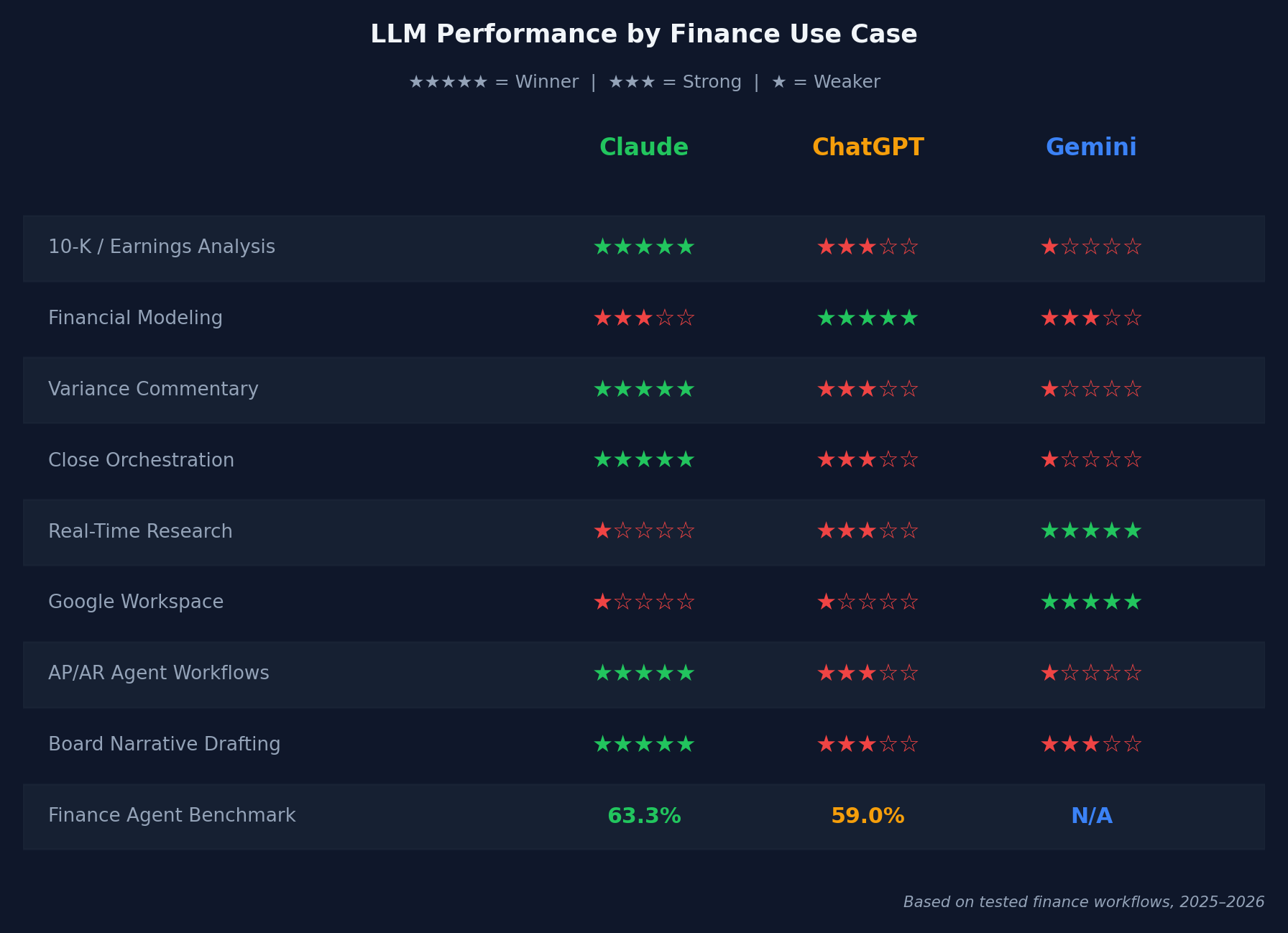
The matrix reveals a clear pattern. Claude wins on tasks where depth of analysis and multi-step reasoning matter most. ChatGPT wins where interactive computation and spreadsheet integration are the priority. Gemini wins wherever the workflow lives inside Google Workspace or requires live data.
Why does this matter for how you buy? Because most finance teams don't need to run a bakeoff — they need to look at their actual task list and see which column has more filled circles.
|
Our head-to-head test results Running the same board narrative prompt through all three models, Claude produced the most structured output with consistent CFO-ready formatting. ChatGPT's version was more conversational; Gemini surfaced one live data point from a recent regulatory update that neither Claude nor ChatGPT included — a genuine advantage of real-time search grounding. |
|
Citation capsule A head-to-head comparison of board narrative drafting across Claude, ChatGPT, and Gemini (2025–2026) found that Claude produced the most structured and citation-traceable output. ChatGPT's output was more conversational. Gemini uniquely surfaced a live regulatory update via real-time search grounding — a capability neither competitor matched without an explicit browsing tool. |
[ INTERNAL LINK — FP&A-specific head-to-head of Claude and ChatGPT → /ChatGPT-vs-Claude-for-FP&A ]
How to Choose: The Finance Stack Decision Tree
The fastest way to pick your primary LLM is to match it to your finance stack, not a benchmark score. Most teams waste weeks on capability evaluations when the right answer is sitting in their software inventory. Stack-fit accounts for integration friction, onboarding time, and security review — all of which have real costs (Gartner, 2024).
Answer these three questions in order:
- Are you primarily in Google Workspace? → Gemini Advanced — native Sheets, Drive, and Meet integration makes it the default choice, regardless of benchmark gaps.
- Do you need interactive financial modeling (Python in chat)? → ChatGPT Plus/Enterprise — Advanced Data Analysis is unmatched for iterative model-building inside the chat interface.
- Are you running ERP-connected agent workflows or long-document analysis? → Claude (API or Claude.ai Team/Enterprise) — the 200K context window and Finance Agent benchmark lead make it the right foundation for autonomous finance workflows.
Most teams land on option 3 as their primary model and add option 1 or 2 as a secondary tool for specific tasks. That's the mature pattern.
Pricing Comparison
|
Model |
Consumer |
Team/ Business |
Notes |
|---|---|---|---|
|
Claude |
$20/mo (Pro) |
$30/user/mo (Team) |
Enterprise API usage-based |
|
ChatGPT |
$20/mo (Plus) |
$30/user/mo (Team) |
Enterprise API usage-based |
|
Gemini |
$19.99/mo (AI Premium) |
Google Workspace add-on |
Included in some Workspace tiers |
The consumer tiers are nearly identical in price. At the team level, the real cost question is API usage for agentic workflows — which can grow quickly if you're running automated financial analysis at scale. Build a usage estimate before committing to API-based deployments.
|
The stack-fit rule most guides ignore The best LLM is whichever one integrates with your existing finance stack. A team running Google Workspace + Looker + BigQuery should default to Gemini Advanced regardless of benchmark scores — the integration value outweighs a 4-point benchmark gap. Benchmark scores matter most when you're deploying a standalone AI workflow disconnected from your existing tools. |
[ INTERNAL LINK — complete guide to generative AI in finance → /generative-ai-finance-guide ]
[ INTERNAL LINK — building a finance copilot with your chosen LLM → /finance-copilot-configure-agents ]
Frequently Asked Questions
Which LLM is best for financial analysis?
Claude leads the Finance Agent benchmark at 63.3% for multi-step financial analysis (Vals AI Finance Agent Benchmark, 2025). It performs best on long-document analysis (10-Ks, earnings transcripts) and agent-driven workflows. For interactive modeling, ChatGPT's Advanced Data Analysis is stronger. For Google Workspace teams, Gemini's native integration often makes it the practical choice despite lower benchmark scores.
Is Claude better than ChatGPT for finance?
For document-heavy analysis, variance commentary, and autonomous agent workflows, yes — Claude leads on the Finance Agent benchmark (63.3% vs. GPT-5's 59%) with a 200K token context window (Anthropic Claude Documentation, 2025). For interactive financial modeling and ad-hoc Python-based data analysis, ChatGPT's Code Interpreter is currently more capable.
Can I use Gemini for financial modeling?
Yes. Gemini Advanced can analyze live Google Sheets data, write formulas, and draft commentary. It has the strongest integration for Google Workspace finance teams (Google DeepMind Gemini, 2025). For complex multi-step financial models or long-document analysis (full 10-Ks), Claude and ChatGPT currently outperform Gemini on tested tasks.
[ INTERNAL LINK — Gemini for finance teams deep dive → /gemini-finance-workflows ]
How much do enterprise LLMs cost for finance teams?
All three major models cost approximately $20/month at the consumer tier and $25–30/user/month at the team tier. Enterprise API pricing is usage-based. Most finance teams under 20 users start with team subscriptions ($500–600/month total) before moving to API-based agentic deployments (Anthropic, OpenAI, Google pricing pages, 2026).
Do I need to choose one LLM or can I use multiple?
Most mature finance teams use two: Claude for document analysis, narrative drafting, and agent workflows; ChatGPT or Gemini for spreadsheet modeling and ad-hoc research. The incremental cost ($40–60/user/month total) is typically justified (McKinsey Global Institute, State of AI in Finance, 2025). Start with one and add the second when you hit a clear capability gap.
[ INTERNAL LINK — running two LLMs in a finance team workflow → /multi-llm-finance-stack ]
The Right LLM for Finance Is the One That Fits Your Actual Work
Here's the honest summary: there isn't one best LLM for finance. There's the best LLM for your finance team's specific tasks and stack.
Key takeaways:
- Claude leads the Finance Agent benchmark — best for document analysis, variance commentary, and agent workflows requiring multi-step reasoning
- ChatGPT leads for interactive financial modeling via Advanced Data Analysis and Microsoft 365 Copilot integration
- Gemini leads for Google Workspace integration and real-time data retrieval — a genuine advantage for Sheets-native finance teams
- Stack-fit rule: match your LLM to your existing tools first, benchmark second — integration friction has real costs
- Most advanced teams run two models; start with one and add the second when you hit a clear capability gap
If you're starting from scratch, pick Claude for document-heavy and agent workflows, or Gemini if your team lives in Google Workspace. Add a second model when the first one consistently hits a wall.
[ INTERNAL LINK — tested Claude workflow guide for finance → /how-to-use-claude-financial-analysis ]
[ INTERNAL LINK — building a finance copilot with your chosen LLM → /finance-copilot-configure-agents ]