How to Use Claude for Financial Analysis: A Tested Workflow Guide (2026)
May 21, 2026
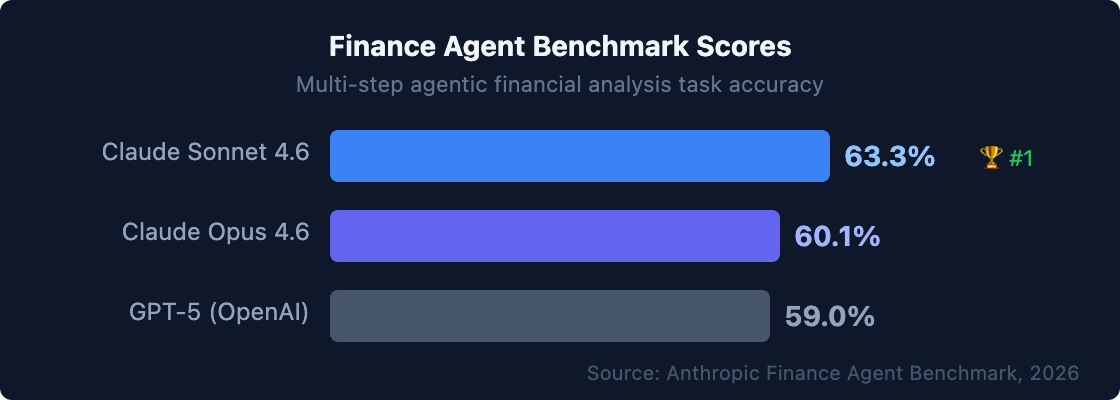
Claude leads the Finance Agent benchmark at 63.3%, outperforming ChatGPT (59%) on multi-step financial analysis tasks. Financial models that historically require 4–6 hours now finish in under 40 minutes with Claude in Excel. Here's the tested workflow guide for finance professionals ready to move from "I've heard of Claude" to "this is part of my daily workflow."
Most "AI for finance" guides give generic advice: use AI for variance commentary, use AI for 10-K analysis. Finance professionals need specific prompts, tested workflows, and honest benchmarks — including where Claude falls short. This guide provides exactly that: six workflows I've tested with the actual prompts, expected outputs, and one section on when Claude isn't the right tool.
|
TL;DR Claude leads the Finance Agent benchmark (63.3% vs. ChatGPT's 59%), excels at long-document analysis (10-Ks, CIMs, earnings transcripts), and integrates natively with LSEG, S&P Global, and PitchBook for live financial data. Financial models that historically take 4–6 hours finish in under 40 minutes with Claude in Excel. This guide walks through six tested workflows with specific prompts and expected outputs. |
Why Claude Works Well for Finance (The Non-Marketing Version)
Claude Sonnet 4.6 scores 63.3% on Anthropic's Finance Agent benchmark — a test of multi-step agentic financial analysis tasks including variance analysis, document review, and report generation. GPT-5 scores 59% on the same benchmark (Anthropic, 2026). That 4-point gap is meaningful for autonomous workflows, where accuracy compounds across sequential steps. For supervised human-in-the-loop use, the practical gap narrows.
Claude's two core finance strengths are long-document comprehension and qualified reasoning. Both matter more for financial work than for most other domains.
Long context window (200,000 tokens). A typical 10-K runs 150–200 pages. A CIM for a mid-market M&A deal often reaches 80–120 pages. Claude can process the full document — including financials, footnotes, risk factors, and MD&A — in a single prompt, without truncating or losing context from earlier sections. For finance professionals working with multi-exhibit earnings reports, 200-page CIMs, or multi-period financial comparisons, this is a material workflow advantage over competitors with shorter context windows.
Qualified reasoning (flags uncertainty instead of fabricating). Claude is more likely than most models to say "I'm not certain about this figure — please verify against the source" rather than confidently providing an incorrect number. For financial analysis, where a hallucinated EPS figure or misquoted revenue number can end up in a board deck, this matters enormously.
|
Honest benchmark caveat Claude hallucinated historical financial data in Wall Street Prep's 2026 AI testing. Every AI model tested by Wall Street Prep also scored zero on circularity handling in financial models. These aren't Claude-specific failures — they apply to all current AI models. The rule is: always validate AI-cited figures against source documents before using them in any deliverable. Claude's hedge behavior makes this safer (it tells you when it's uncertain), but it doesn't eliminate the verification requirement.
Workflow 1: Financial Statement Analysis (10-K / Earnings)Claude's strongest finance workflow is long-document analysis. With a full 10-K or earnings transcript, Claude can extract key metrics, identify material changes, flag risk factor language shifts, and summarize MD&A insights — in minutes rather than hours. McKinsey documents this as the source of the 9-hours-to-30-minutes improvement in investment brief production (McKinsey, 2023). Step-by-step:
Copy-ready prompt template: ``` You are a senior financial analyst. Analyze the attached 10-K filing and provide:
Cite the specific page number or section for every claim. Flag any figure where you had low confidence in the source. ``` Expected output: a structured 4-section response with a formatted table, specific source citations, and a confidence flag on any ambiguous data point. Total analysis time: 5–10 minutes vs. 6–9 hours manually.
[ INTERNAL LINK — how GenAI is transforming financial statement analysis → /complete workflow guide with credit analysis and earnings prompts ]
Workflow 2: Variance Commentary GenerationVariance commentary is the highest-volume narrative task in FP&A. Claude can generate CFO-ready commentary from structured actuals vs. budget data — cutting 3–4 hours of analyst drafting to under 15 minutes. This is the starting workflow I recommend for every finance team deploying Claude for the first time. Step-by-step:
Copy-ready prompt template: ``` You are an FP&A analyst preparing CFO commentary for the board pack. Below is the P&L actuals vs. budget for [Month/Period]: [Paste data table here] Write variance commentary covering:
Use precise dollar amounts from the data. Flag any variance where the business driver is unclear from the numbers alone. ``` Expected output: 400–600 word commentary in professional CFO-pack tone, with specific dollar and percentage citations for each variance, and "[DRIVER UNCLEAR — add context]" flags where AI couldn't infer the cause. The flagging behavior is a feature, not a failure. Claude tells you which variances it explained confidently and which require your business knowledge — which means you spend time adding value, not guessing where to look. [ INTERNAL LINK — AI for month-end variance commentary prompts → /more tested variance commentary prompts and examples ]
Workflow 3: Financial Model Building in ExcelClaude in Excel (February 2026) brought Claude directly into the Excel sidebar with the ability to build financial models, edit pivot tables, apply conditional formatting, and fix formula errors using natural language instructions. Financial models that historically took 4–6 hours to build now complete in under 40 minutes according to early beta analysis in early user testing. early Claude in Excel testing indicates 30–40% time recovery on mechanical model assembly tasks. Step-by-step:
Copy-ready model description prompt: ``` Build a 3-year DCF model for a SaaS business with the following assumptions:
Include a sensitivity table for terminal growth rate (2–4%) and WACC (8–12%). Format the output with separate tabs for Assumptions, Income Statement, Cash Flow, and DCF Summary. ``` Live financial data integration: Claude's MCP connectors pull live data from LSEG, S&P Global, and PitchBook directly into Excel — yielding current bond rates, FX data, and comparable company metrics without leaving the spreadsheet. This is a significant workflow advantage for transaction work and investment analysis. ⚠️ Governance note: Always validate formulas and check circular references manually before using any Claude-built model in a presentation or investment decision. Wall Street Prep's 2026 testing confirmed that no current AI model handles circularity reliably.
Workflow 4: Earnings Call PreparationFinance teams use Claude to prepare earnings call scripts, anticipate analyst questions, and draft management responses — typically saving 4–6 hours of prep work per quarter. The earnings call preparation use case is where Claude's long context window is particularly valuable: you can upload three prior call transcripts, the current quarter financials, and the investor presentation simultaneously. Copy-ready preparation prompt: ``` You are preparing an earnings call script for [Company] for Q[X] [Year]. Key financials for this quarter: [paste key metrics — revenue, EPS, margin, guidance] Prior Q earnings call transcript for reference: [paste or upload] Analyst consensus estimates: [paste or note "above/below consensus by X%"] Provide:
``` [ INTERNAL LINK — AI for board reporting and investor decks → /how CFOs automate investor communications ]
Workflow 5: Due Diligence and CIM AnalysisFor PE-backed companies and M&A teams, Claude's ability to process 150–200 page CIM documents and extract structured financial data, risk flags, and key deal terms compresses early-stage due diligence from two analyst days to under an hour. Copy-ready CIM analysis prompt: ``` You are a financial analyst conducting initial due diligence. Analyze this Confidential Information Memorandum and provide:
Cite the specific page or section for every claim. ``` Important limitations: use Claude Enterprise (not free/standard tier) for confidential M&A data — enterprise subscriptions contractually exclude data from model training. For highly sensitive deals, involve your legal team before sharing any document with an AI platform.
Workflow 6: Regulatory and Compliance Document ReviewClaude's long context window and precise citation behavior make it well-suited for reviewing lengthy regulatory filings, ISDA agreements, and loan covenants — extracting the specific conditions, triggers, or obligations that require action. Copy-ready covenant review prompt: ``` Review this credit agreement and extract:
Cite the section number for every provision. ``` When Claude Isn't the Right ToolClaude is not the right tool for every finance workflow. Being specific about this builds more reliable practice than pretending AI handles everything. ❌ Circularity-dependent financial models. No AI model handles circular references in Excel models reliably as of 2026. Build circular logic (EBIT → tax → net income → retained earnings → equity → WACC → DCF) in Excel using your own formula structure, then use Claude to build the non-circular components. ❌ Real-time market data (without connectors). Claude doesn't have live market data access without an MCP connector. For current stock prices, FX rates, or bond yields, use Claude + LSEG/Bloomberg MCP connector, or pull the data from your data source before running the analysis prompt. ❌ Confidential client data on free/standard tier. Free and standard Claude subscriptions may train on input data. For any confidential financial information — unreported earnings, M&A targets, client financials — use Claude Enterprise or Teams only. ❌ Legal or tax filings. Claude can draft; a licensed professional must review, verify, and sign off. AI-assisted drafts for regulatory filings, tax returns, or legal agreements are not substitutes for professional review.
Frequently Asked QuestionsIs Claude better than ChatGPT for finance?For long-document analysis (10-Ks, CIMs, contracts) and compliance-sensitive outputs, Claude consistently outperforms ChatGPT. Claude leads the Finance Agent benchmark at 63.3% vs. ChatGPT's 59% (Vals AI, 2026). For interactive financial modeling and Python-based data analysis using Code Interpreter, ChatGPT remains the stronger choice. Most finance professionals benefit from using both. [INTERNAL-LINK: see our full LLM comparison → best large language models for finance work] How do I use Claude in Excel?Claude in Excel is available via the Claude.ai Teams or Enterprise subscription (February 2026). Open the Claude sidebar in Excel, describe your model or formula need in plain language, and Claude builds it directly in your spreadsheet. MCP connectors enable live data from LSEG, S&P Global, and PitchBook. Always validate formulas manually before using any Claude-built model in a presentation. What are the best Claude prompts for finance?The most effective finance prompts share three structural elements: (1) explicit role assignment ("You are a senior FP&A analyst"), (2) structured output specification with numbered sections and format instructions, and (3) a source citation requirement ("cite the specific line item or page number for every figure you reference"). This structure produces more accurate, more consistent outputs than open-ended prompts. Does Claude hallucinate financial data?Yes — all AI models, including Claude, can generate plausible-sounding but incorrect financial figures. Wall Street Prep's 2026 testing found multiple instances of hallucinated historical financial data across AI models. Claude's mitigation behavior (flagging uncertainty rather than confidently asserting incorrect data) makes it safer for finance use than models that don't hedge. Always validate cited figures against source documents before using them in any report or presentation. Is it safe to use Claude with confidential financial data?Use Claude Enterprise or Teams (not the free or standard consumer tier). Enterprise and Teams subscriptions contractually exclude your data from model training — the standard tier does not provide this protection. Even with enterprise subscriptions, involve your legal or compliance team before sharing M&A targets, non-public financials, or personal financial information. Most enterprise finance teams should also establish a written AI data policy before deployment. Key Takeaways
For the complete LLM comparison across all finance use cases, see [INTERNAL-LINK: best LLMs for finance → Claude vs. ChatGPT vs. Gemini comparison]. For the full GenAI landscape and strategic roadmap, return to [INTERNAL-LINK: generative AI in finance complete CFO guide → pillar page]. |