Building a Finance Copilot: How to Configure AI Agents for Your Specific Workflows (2026)
Jun 10, 2026
Microsoft released Finance Agents as part of Microsoft 365 Wave 2 in November 2025. SAP introduced Joule for Finance. Workday has its own AI-powered Copilot. Every major finance platform now has an AI agent story. The question isn't whether a finance copilot is available — it's how to configure one that actually works for your workflows, your data, and your governance requirements.
Most finance copilot implementations fail not because the AI is incapable. They fail because the workflow isn't documented, the data isn't clean, or governance isn't in place before configuration begins. These aren't AI problems — they're preparation problems. The technology is ready. The question is whether your team is.
This guide walks through a four-step configuration framework: workflow mapping, data connection, agent design, and governance setup. Each step includes specific examples from the three finance workflows where agents consistently deliver the highest return.
[INTERNAL-LINK: complete guide to generative AI in finance → generative-ai-finance-guide]
|
TL;DR A finance copilot is an AI agent (or set of agents) configured to your specific financial workflows, data sources, and governance rules. Microsoft 365 Finance Agents (Wave 2, Nov 2025) include native Reconciliation and Variance Analysis agents. Copilot Studio offers 1,400+ connectors for custom ERP-connected agents. This guide walks through the four-step configuration process — from workflow mapping to governance setup — so your first agent goes live in 4 weeks, not 4 months. |
What Does "Finance Copilot" Actually Mean: Platform vs. Custom?
A finance copilot is any AI agent configured to assist or automate a specific finance workflow. Microsoft 365 Finance Agents (Wave 2, November 2025) include a native Reconciliation Agent and Variance Analysis Agent — both production-ready, with human-in-the-loop preview built in (Microsoft, Nov 2025). This includes both native platform agents and custom-built agents using Claude API, OpenAI API, or Copilot Studio.
The distinction between platform agents and custom agents matters for three things: deployment timeline, configuration complexity, and cost. Getting this choice wrong doesn't doom a project, but it adds weeks of rework and budget you didn't plan for.
|
Native ERP agent |
SAP Joule, Workday Copilot |
Weeks |
Low-code |
ERP-native workflows |
|
Microsoft 365 Finance Agents |
Reconciliation Agent, Variance Analysis Agent |
Weeks |
Low-code |
M365 + Dynamics users |
|
Copilot Studio custom agents |
Any workflow |
4–8 weeks |
Low-code + connectors |
Multi-system workflows |
|
API-built custom agents |
Claude API, GPT-5 API |
8–16 weeks |
Developer required |
Complex agentic workflows |
Copilot Studio now offers 1,400+ pre-built connectors (Microsoft, 2025). Agent Mode in Excel reached general availability in January 2026 — meaning analysts can run agent-assisted analysis directly inside their existing spreadsheet environment without any additional tooling.
|
The framing almost no configuration guide addresses A finance copilot isn't a product you buy and deploy — it's a series of decisions about scope, data access, output format, and governance. Most teams fail because they skip the workflow mapping step and try to configure an agent before documenting what the human actually does. The technology is the easy part. |
Citation: Microsoft 365 Finance Agents (Wave 2, Nov 2025) include a native Reconciliation Agent and Variance Analysis Agent with HITL preview — the lowest-friction enterprise finance copilot deployment path available in 2026. Copilot Studio extends this with 1,400+ pre-built connectors for non-Microsoft ERP environments (Microsoft, Nov 2025).
[ INTERNAL LINK — what AI agents are and how they work in finance → /what-are-ai-agents-finance ]
Step 1 — Workflow Mapping: The Step Most Teams Skip
Before you configure a single agent, document the exact human workflow the agent will replicate or assist. An agent configured without this documentation will produce generic, low-quality outputs — regardless of how capable the underlying AI model is. This step takes 30–60 minutes. Most teams skip it and spend weeks fixing the results.
Every workflow map has four components:
- Input: What data sources does the human access? (ERP, bank statement, budget file, prior-period actuals)
- Steps: What does the human do, in what sequence? (pull actuals, compare to budget, identify variances above a threshold, trace root cause, draft commentary)
- Output: What is the exact deliverable format? (word count, table structure, approval routing)
- Exceptions: What does the human escalate vs. resolve themselves? (materiality threshold, prior-period restatements)
Example: Variance Commentary Workflow
This is the most common starting workflow for finance teams — and the one where scope definition makes the biggest quality difference.
- Input: Monthly actuals from ERP + approved budget from planning tool + prior month commentary file
- Steps: Calculate variances by line item → filter to amounts above $50K → identify the top five → trace each to GL detail → draft explanation → check against prior month for consistency
- Output: 3–5 bullet commentary per variance line, formatted for insertion into the board pack
- Exceptions: Variances from prior-period restatements → flag for CFO review. Variances with no GL-traceable explanation → escalate to FP&A manager.
If you can't map what the human does in under 30 minutes, you're not ready to configure an agent for it. That's not a criticism — it's a diagnostic. Undocumented workflows produce inconsistent human output. They produce worse AI output.
|
The configuration mistake I made first time I tried to build a variance commentary agent that covered 15 variance categories at once. The outputs were generic and required as much editing as writing from scratch. When I narrowed the scope to one workflow — "draft commentary for budget variances over $50K in the Sales line only" — the quality jumped immediately. Scope specificity is the single biggest driver of agent quality. |
[ INTERNAL LINK — AI for financial statement analysis workflows → /genai-financial-statement-analysis ]
Step 2 — Data Connection: Why Clean Data Is Non-Negotiable
An agent is only as good as the data it can access. The most common finance copilot failure mode is an agent that produces plausible-sounding outputs based on incomplete or stale data — a more dangerous problem than obviously wrong outputs. Before connecting your ERP, verify: the data is current, the relevant fields are accessible, and access permissions are appropriately scoped.
Run through this checklist before any agent goes live:
- ✅ ERP/GL data: real-time or same-day refresh — not week-old month-end batch exports
- ✅ Budget data: current approved version accessible — not last month's file on a local drive
- ✅ Bank data: live feed or same-day statement download
- ✅ Prior period data: at least 12 months of actuals for trend context
- ✅ Chart of accounts: documented with consistent naming (not five variations of "Cost of Goods Sold")
- ⚠️ Data permission scoping: the agent should access only the data needed for its designated workflow — not unrestricted ERP access
Connection Options by Platform
The connection method depends on which platform you're building on.
- Microsoft 365 Finance Agents: native connectors to Dynamics 365 Finance, Excel, and SharePoint — no additional configuration required for M365 environments
- Copilot Studio: 1,400+ pre-built connectors covering SAP, Salesforce, NetSuite, Workday, Xero, and QuickBooks (Microsoft, 2025)
- Claude API / custom builds: REST API connectors; most enterprise ERPs support API data access with appropriate authentication
Document which data sources each agent accesses before going live. Auditors will ask — and "the AI connected to whatever it needed" is not an acceptable answer.
Citation: Finance AI agents require same-day or real-time data access to produce reliable outputs. Agents operating on stale or incomplete data generate plausible-sounding errors — a worse failure mode than obviously wrong output because they're harder to catch in review (AIforCFO.com analysis, 2026).
[ INTERNAL LINK — governance requirements for finance AI agents → /what-are-ai-agents-finance ]
Step 3 — Agent Design: Scope, Instructions, and Output Format
Agent quality is almost entirely determined by the specificity of your scope definition and instructions. The single most common configuration mistake is making the agent's scope too broad. A variance commentary agent scoped to one line item and one threshold produces dramatically better output than one scoped to "all variances" (AIforCFO.com analysis, 2026). Get the scope right first. Everything else is refinement.
Scope Definition
Scope is your first configuration decision — and the one most worth spending time on.
- Too broad: "Review all financial variances and provide commentary"
- Right scope: "Review the Revenue and Gross Margin lines only. Flag variances greater than $50K versus budget and $25K versus prior year. Ignore lines with zero budget."
The rule: one agent, one workflow. Don't build Swiss Army knife agents. A single focused agent will outperform a multi-purpose agent every time — because the instructions are clearer, the outputs are more specific, and the review step is faster.
System Instructions: The Standing Brief
Think of system instructions as the onboarding document for a new analyst who has no context about your business. They need to know: what the business does, who reads the outputs, the required format and tone, what to flag vs. resolve independently, and what to never assume without verifying.
Here's a working instruction template for a variance commentary agent:
```
"You are a financial analyst assistant for [Company]. Your job is to produce
variance commentary for the monthly CFO pack. Always cite the specific GL
account driving a variance. Never speculate about causes you cannot verify
from the data. Flag any variance where the GL detail doesn't explain the full
amount. Use [Company]'s standard variance commentary format:
[Variance type] was [favorable/unfavorable] by $[amount] vs.
[budget/prior year] due to [specific driver]."
```
What does the agent do when it hits an exception? The instructions should answer that. What it shouldn't do: make an assumption, skip the line, or produce commentary with no data backing.
Output Format Specification
Output format is the third element — and often the last one teams think about.
Specify: exact format (bullet points vs. prose), length (3–5 sentences per variance line), terminology (use company-specific account names, not generic labels like "revenue"), and routing instructions (add "[REVIEW REQUIRED]" on any variance above $200K). Providing a completed example output inside the instructions dramatically improves agent quality. Show it what "done" looks like.
Microsoft 365 approach: The Variance Analysis Agent and Reconciliation Agent include pre-built instruction frameworks. You customize materiality thresholds, entity scope, and escalation rules — without writing instructions from scratch. That's the real time saving of native platform agents.
!Finance professional reviewing AI-generated analysis on a dual monitor setup
Citation: Agent quality is almost entirely determined by scope specificity: a variance commentary agent scoped to one line item and one threshold produces dramatically better outputs than one scoped broadly across all variances. Providing a completed example output in the instructions — showing the agent what "done" looks like — is the most reliable quality improvement technique (AIforCFO.com analysis, 2026).
Step 4 — Governance Setup: The Non-Negotiable Controls
Every finance agent requires three governance controls before going live: a human approver for all material outputs, a full audit trail of every agent action, and a defined escalation path for exceptions above a materiality threshold. Gartner predicts over 40% of agentic AI projects will be cancelled by end of 2027 — the primary cause being inadequate risk controls, not AI capability failures (Gartner, Jun 2025).
Governance isn't a post-deployment retrofit. It's a configuration requirement. Build these three controls in before you run your first live workflow.
Control 1: Human Approval Gate
Every output entering a financial record, presented to leadership, or sent externally requires human review and explicit approval. This isn't a limitation — it's the design.
Microsoft 365 Finance Agents shipped with HITL (human-in-the-loop) preview built in as of the November 2025 release. It's not bolted on; it's part of the agent's native workflow. For custom agents built via API, the approval gate is a configuration decision — and one you must make deliberately. Build it in. Don't assume it's optional.
Control 2: Full Audit Trail
Every agent action must be logged: which data was accessed, what reasoning was applied, what output was produced, who reviewed, and what was changed before approval.
For SOX environments, the audit trail must be accessible to auditors — not just visible inside the AI platform's internal logs. Microsoft 365 Finance Agents log natively to Microsoft Purview. For Claude API or custom builds, log all inputs, outputs, and tool calls to your SIEM or designated audit system. If it isn't in the audit log, it didn't happen — at least not as far as your external auditors are concerned.
Control 3: Escalation Path
Define the materiality threshold above which the agent flags for human review rather than proceeding autonomously. Define the human reviewer by role, not by name — people change, roles don't. Define what happens when the designated reviewer is unavailable: the agent waits. It doesn't skip the review step.
What does that look like in practice? An agent processing variance commentary: auto-proceed on variances under $50K. Flag for senior analyst review on variances $50K–$200K. Flag for CFO review on variances above $200K. No variance above the top threshold advances without explicit approval.
Citation: Gartner predicts over 40% of agentic AI projects will be cancelled by end of 2027 — the primary cause being inadequate risk controls, not AI capability failures. Three controls are non-negotiable before any finance agent goes live: human approval gate, full audit trail, and defined materiality-based escalation path (Gartner, Jun 2025).
[ INTERNAL LINK — the governance question every CFO must answer → /what-are-ai-agents-finance ]
What Are the Three Highest-ROI Finance Copilot Starting Points?
Most finance teams should start their copilot deployment with one of three workflows: bank reconciliation, variance commentary, or month-end close checklist orchestration. Bank reconciliation agents consistently deliver 80–90% reductions in manual processing time — the highest-documented ROI of any finance copilot starting workflow (Multiple case studies, 2025). These three share one quality: the workflow is well-defined, the volume is high, and the governance controls are straightforward to implement.
The chart below maps five common finance workflows by time saved, configuration complexity, and governance risk. Start in the green zone — high ROI, low complexity. Build capability and organizational trust before moving to the amber and red zones.
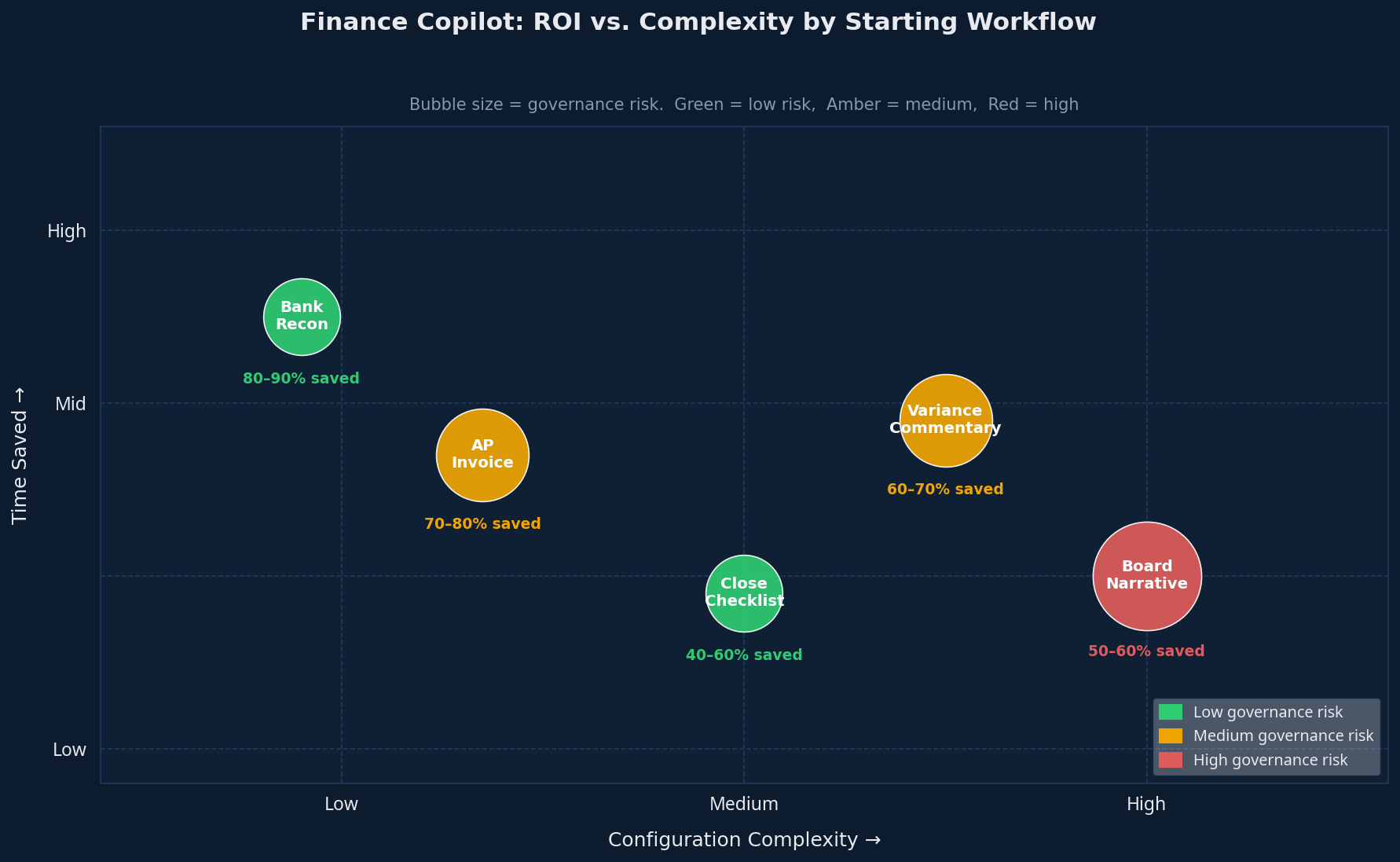
Here's how each starting workflow stacks up:
|
WORKFLOW |
TIME SAVING |
CONFIGURATION COMPLEXITY |
GOVERNANCE RISK |
|---|---|---|---|
|
Bank reconciliation |
80–90% |
Low |
Low |
|
AP invoice coding |
70–80% |
Low |
Medium |
|
Variance commentary |
60–70% |
Medium |
Medium |
|
Month-end close checklist |
40–60% |
Low–Medium |
Low |
|
Board narrative first draft |
50–60% |
High |
High |
Why does bank reconciliation lead? The workflow is fully structured. The inputs are fixed (bank statement + GL). The matching logic is rule-based. The exceptions are well-defined. It's close to an ideal agent task — high volume, repeatable, low judgment requirement, and easy to audit.
Variance commentary requires more judgment. The agent needs to trace causes, not just calculate differences. Start here after reconciliation is stable.
[ INTERNAL LINK — governance framework for these workflows → /what-are-ai-agents-finance ]
[ INTERNAL LINK — FP&A-specific agentic workflows → /agentic-ai-fpa-autonomous-forecasting ]
Platform Configuration Specifics: Microsoft 365, Copilot Studio, and API
Microsoft 365 Finance Agents (Wave 2) are the lowest-friction deployment path for most enterprise finance teams using Dynamics 365 or M365. Copilot Studio is the strongest option for teams needing custom connectors to non-Microsoft ERPs. API-built agents — using Claude or GPT — offer maximum flexibility, but they require developer involvement and a longer timeline (Microsoft, Nov 2025).
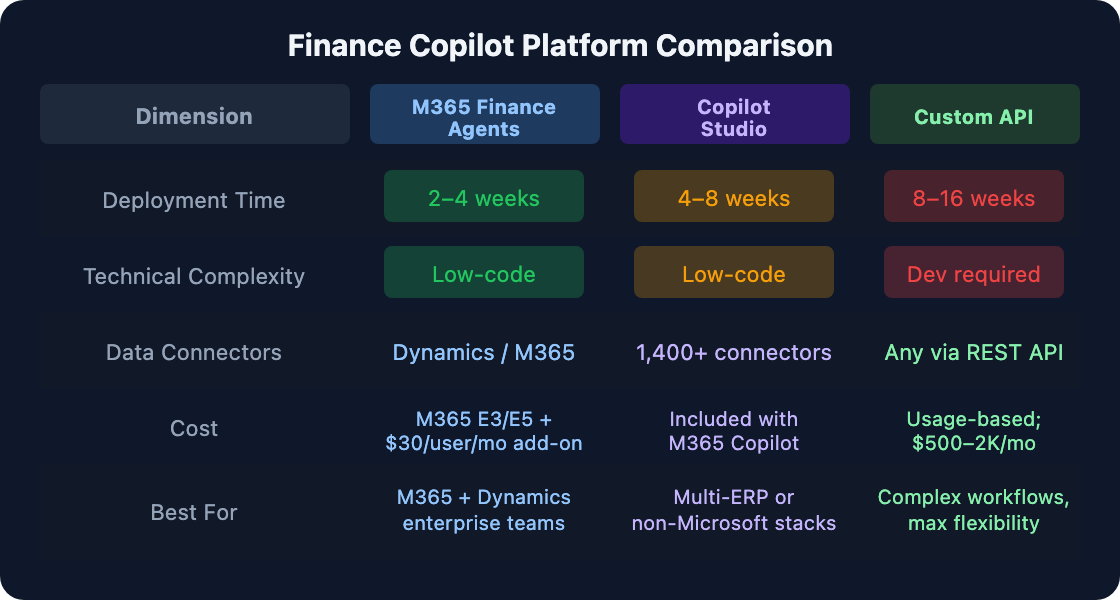
Here's the key cost detail most guides gloss over. Microsoft 365 Finance Agents are included in M365 E3/E5 and Dynamics 365 subscriptions, with the Copilot licensing add-on at $30/user/month. Copilot Studio is included with existing M365 Copilot licenses — no separate charge for teams already in the Microsoft ecosystem. Custom API agents using Claude or OpenAI run on usage-based pricing; typical finance team deployments run $500–2,000/month depending on workflow volume.
|
The configuration timeline reality check The 4–8 week deployment estimate for native platform agents assumes your data is ready and your workflows are documented before you start. In practice, data readiness adds 2–6 weeks to every timeline. The most common deployment blocker isn't the agent configuration — it's discovering that your budget data lives in three different Excel files and hasn't been reconciled to your ERP in two months. |
[ INTERNAL LINK — complete guide to generative AI in finance → /generative-ai-finance-guide ]
[ INTERNAL LINK — AI for financial statement analysis workflows → /genai-financial-statement-analysis ]
Frequently Asked Questions
What is a finance copilot?
A finance copilot is an AI agent (or set of agents) configured to assist or automate specific finance workflows — bank reconciliation, variance commentary, close orchestration, or board reporting. Microsoft 365 Finance Agents (released November 2025) and SAP Joule are native platform examples. Custom copilots are built via AI APIs connected to your actual financial data and configured for your specific workflows — the key distinction from generic AI chat tools. [INTERNAL-LINK: full explainer on finance AI agents → what-are-ai-agents-finance]
How long does it take to set up a finance AI copilot?
Native platform agents — Microsoft 365 Finance Agents, Copilot Studio — run 4–8 weeks from workflow mapping to live deployment. Custom API-built agents take 8–16 weeks with developer involvement. The timeline is driven more by data readiness and workflow documentation than by technical complexity. In practice, data cleaning often doubles initial estimates — plan for it rather than discover it mid-project. [INTERNAL-LINK: ROI benchmarks for finance AI deployment → roi-of-ai-in-finance-benchmarks-and-business-case-template]
What's the difference between Microsoft Copilot and a custom finance agent?
Microsoft 365 Finance Agents (Wave 2) are pre-configured agents for specific workflows — Reconciliation, Variance Analysis — that connect natively to Dynamics 365 and M365 data (Microsoft, Nov 2025). Custom finance agents via Copilot Studio or Claude/OpenAI API are built for your specific data sources and workflows. They're more flexible but require more configuration effort and, for API builds, developer resources. Most enterprise teams start with M365 agents and extend to custom builds.
How much does a finance copilot cost?
Microsoft 365 Finance Agents are included in M365 E3/E5 and Dynamics 365 subscriptions, with Copilot add-ons at $30/user/month. Custom agents via Claude API or OpenAI API run on usage-based pricing — typical finance team deployments range from $500–2,000/month depending on volume. Purpose-built finance AI platforms (Workiva AI, Planful AI) are contract-priced. Most teams start with native platform agents before committing to custom builds and the higher investment that comes with them.
Is a finance copilot safe for SOX-compliant environments?
Yes — with the right controls built in from day one. Human approval for all material outputs, a full audit trail logged to an auditor-accessible system (Microsoft Purview or equivalent), and documented escalation paths for exceptions above materiality. SOX compliance is a design requirement, not a post-deployment retrofit. Gartner's finding that 40%+ of agentic projects are cancelled due to inadequate risk controls (Gartner, Jun 2025) is a direct consequence of treating governance as an afterthought. Build HITL review, audit logging, and exception escalation into the configuration from the start.
Conclusion: Your Four-Step Configuration Checklist
The finance copilot isn't coming — it's here. Microsoft's Wave 2 Finance Agents, Copilot Studio's 1,400+ connectors, and GA Agent Mode in Excel mean the deployment infrastructure is production-ready for most enterprise finance teams in 2026. The constraint isn't the technology. It's preparation.
Here's what the four-step framework delivers when you follow it in sequence:
- Finance copilot = AI agent configured for your specific workflows, data, and governance — not a generic chat tool
- Step 1: Map the human workflow before touching configuration — inputs, steps, outputs, exceptions
- Step 2: Verify data readiness — current, accessible, permission-scoped, consistently structured
- Step 3: Write scope-specific instructions — one agent, one workflow, one output format
- Step 4: Build governance before go-live — HITL review, audit trail, materiality-based escalation
- Start here: Bank reconciliation, variance commentary, or close checklist — proven ROI, manageable risk
- Scope specificity is the single biggest quality driver — narrow it further than feels comfortable
The teams that get their first agent live in four weeks aren't moving faster on technology. They're moving faster on preparation. They mapped the workflow. They cleaned the data. They wrote specific instructions.
For foundational context on how AI agents work in finance, see What Are AI Agents in Finance?. For the FP&A workflows this configuration framework enables, see Agentic AI in FP&A: How Finance Teams Are Running Autonomous Forecasting. [INTERNAL-LINK: what AI agents are and how they work → what-are-ai-agents-finance] [INTERNAL-LINK: FP&A agent use cases → agentic-ai-fpa-autonomous-forecasting]