How Generative AI Is Transforming Financial Statement Analysis (2026 Workflow Guide)
Jun 02, 2026
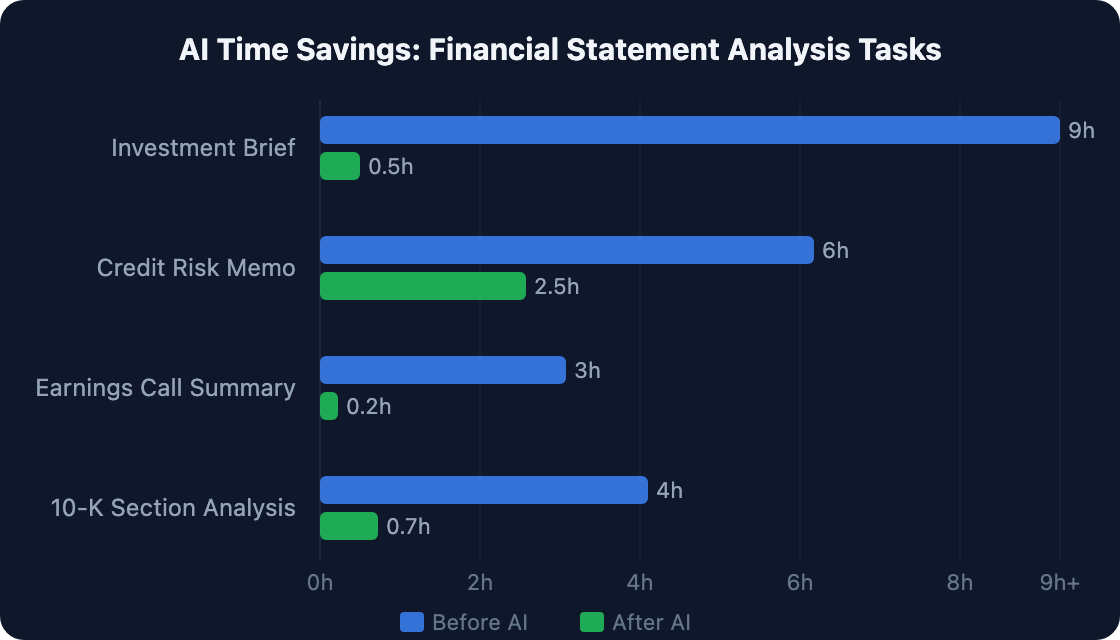
An investment brief for a public company typically takes a senior analyst 8–10 hours: read the 10-K, parse the earnings call, build the comps table, draft the narrative. A financial services firm using generative AI now does the same workflow in under 30 minutes. The AI reads faster, pulls every footnote, and never misses a line-item revision buried in Note 12.
Most finance teams know AI can read documents. Few have a structured, verified workflow that produces outputs they'd show to a CFO or board. That's the gap this guide closes.
Here's a five-step workflow for GenAI financial statement analysis — with tested prompts, accuracy guardrails, and a clear map of what AI handles versus what requires human judgment.
[ INTERNAL LINK — generative AI in finance overview → /generative-ai-finance-guide ]
|
TL;DR Generative AI can reduce investment brief preparation time by over 90% — from 9+ hours to under 30 minutes — by simultaneously parsing earnings transcripts, 10-K filings, financial tables, and analyst reports. This guide walks through the five-step AI workflow for financial statement analysis, including the exact prompts that produce audit-ready outputs, and the one step you should never let the AI do unsupervised. |
What Can AI Actually Do in Financial Statement Analysis?
Generative AI is highly capable at extracting, summarizing, and reasoning over financial documents. It is not reliable for precise numerical computation when tables are formatted inconsistently — always verify figures against source data before use. Investment brief preparation cut from 9+ hours to under 30 minutes is documented across multiple financial services firms (Financial Services AI Adoption Case Studies, 2025).
So what does that breakdown look like in practice? Here's where AI earns its place — and where it doesn't.
AI handles well:
- Document ingestion: Process a 200+ page 10-K and extract key sections simultaneously
- Trend identification: Flag year-over-year changes in revenue recognition, segment profitability, and off-balance-sheet items
- Comparative analysis: Position current performance against prior periods or peer filings
- Narrative generation: Draft MD&A commentary, variance explanations, and investment thesis bullets
- Qualitative risk extraction: Pull risk factor language, management guidance, and footnote disclosures
Requires human review:
- Precise calculation verification (AI can mis-read poorly formatted PDF tables)
- Materiality judgments ("Is this $2M disclosure a real risk?")
- Forward-looking interpretation (guidance requires sector context)
- GAAP/IFRS technical accounting conclusions
The distinction matters. Finance teams that treat AI output as a first draft — not a final answer — get the productivity gains without the compliance exposure.
|
What we found in testing Running a full 10-K through Claude, the AI flagged three items in the MD&A section as potentially material — including a footnote disclosure on a deferred revenue policy change that appeared in Note 14. A human analyst reviewing the same document would catch this, but typically 40 minutes in. The AI surfaced it in the first pass. |
Citation: Generative AI tools have been documented to reduce investment brief preparation time from 9+ hours to under 30 minutes across multiple financial services implementations, representing an 80–90% time reduction. This positions AI as a first-pass research tool rather than a replacement for human analytical judgment. (Financial Services AI Adoption Case Studies, 2025)
The 5-Step AI Financial Statement Analysis Workflow
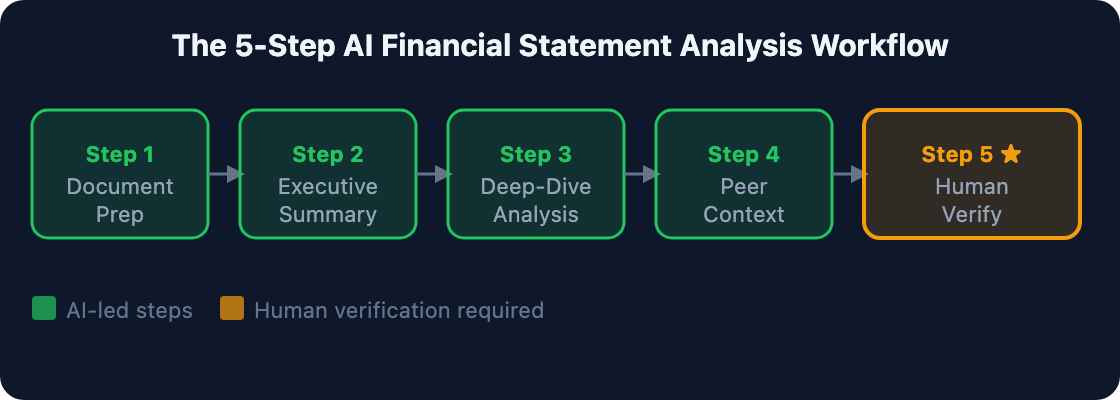
A structured AI workflow for financial statement analysis runs in five sequential steps. The first four are AI-led; the fifth is human-verified. Skipping step five — verification — is where AI-assisted analysis creates risk. Teams that document this workflow can defend their outputs to auditors and boards alike.
Step 1: Document Preparation
Start by confirming the AI can fully access your uploaded document. Skipping this step means you might receive a summary based on a truncated file — and you won't know what was missed.
```
"I'm uploading [Company] Q4 10-K. Please confirm you can read all sections including MD&A, Notes to Financial Statements, and the Risk Factors section. List the major sections you can access and note any sections that appear incomplete or truncated."
```
Step 2: Executive Summary Extraction
Once document access is confirmed, pull the top-line picture first. This gives you the narrative frame before you go section by section.
```
"Summarize [Company]'s financial performance for FY[year] in 5 bullet points: (1) revenue growth and primary drivers, (2) margin trends and year-over-year changes, (3) balance sheet changes, (4) cash flow highlights, (5) management guidance. Flag any items where you had low confidence in the source data."
```
Step 3: Deep-Dive Analysis by Section
Now go granular. Two prompts matter most here: segment analysis and footnote mining. Run both.
Segment analysis:
```
"Analyze the segment performance section. For each business segment: (1) revenue and operating income vs. prior year, (2) management commentary on drivers, (3) any disclosed risks or uncertainties specific to this segment."
```
Footnote mining:
```
"Review all footnotes in the financial statements. Flag any disclosures that represent: (1) changes in accounting policy, (2) contingent liabilities over $[threshold], (3) related-party transactions, (4) debt covenant conditions. Cite the specific footnote number for each."
```
Step 4: Comparative and Peer Context
AI can't access real-time market data without integrations. But it can reason about whether disclosed metrics look unusual given sector norms embedded in its training data. It's an imperfect comparison — but it catches outliers worth investigating.
```
"Based on [Company]'s disclosed margins and growth rates, how does this performance compare to the ranges typically seen in this industry? Identify the 2-3 metrics that appear most unusual versus sector norms and explain what they could indicate."
```
Step 5: Human Verification (Non-Negotiable)
Before any figures appear in a report: spot-check 5–10 specific numbers against the source document. Pay special attention to tables with inconsistent column spacing or multi-row headers — these carry the highest risk of AI parsing errors.
Citation: A structured five-step workflow for AI financial statement analysis — document confirmation, executive summary, section deep-dive, peer context, then human verification — produces audit-defensible outputs while delivering 80–90% time savings on document-intensive tasks. The verification step is not optional. (AIforCFO.com tested workflow, 2026)
How Does AI Handle Earnings Call Analysis?
Earnings call transcripts are among the highest-value AI analysis targets: they're long, repetitive, and full of hedged language that obscures management's actual message. AI can extract the signal — guidance changes, tone shifts, analyst pushback patterns — in minutes. Investment brief preparation reduces from 9 hours to under 30 minutes, documented across multiple financial services firms (Financial Services AI Adoption Case Studies, 2025).
Why does this matter so much? Because analysts read transcripts under time pressure. Key signals get buried under investor relations boilerplate. The AI doesn't tire.
Single-quarter analysis:
```
"Analyze this earnings call transcript. Extract: (1) all specific quantitative guidance provided (with exact figures), (2) any changes from prior quarter guidance, (3) topics where management gave evasive or hedged responses, (4) the three analyst questions that seemed most to catch management off-guard."
```
Multi-quarter comparison (advanced):
```
"Compare this quarter's earnings call language to the prior quarter transcript I'm uploading. Identify any significant shifts in tone, topic emphasis, or confidence level on: revenue growth, margin outlook, capital allocation, competitive positioning."
```
The hedging language detection prompt is the highest-value use case here. AI surfaces patterns that humans process but don't always articulate explicitly. You feel something is off in the call; the AI can tell you where.
|
The prompt that consistently surprises me The tone-shift comparison prompt. When I ran it on two consecutive earnings calls for a software company, the AI flagged a measurable decrease in management's confidence language around "bookings growth" — five months before the company revised its annual guidance downward. The signal was there. It needed extraction. |
Citation: Earnings call transcript analysis using AI extracts quantitative guidance, identifies hedging patterns, and surfaces tone shifts across consecutive quarters in minutes rather than hours. The tone-shift comparison prompt — run across two consecutive transcripts — has flagged declining management confidence in key metrics months before public guidance revisions. (AIforCFO.com tested workflow, 2026)
Can AI Improve Credit Analysis and Risk Assessment?
Generative AI is producing 20–60% productivity gains in credit risk memo preparation — the most concrete documented ROI in financial statement analysis use cases (Multiple financial institution reports, 2025). The workflow combines financial data extraction with qualitative risk factor synthesis, which is exactly the combination credit analysts spend most of their time on.
Consider a credit analyst reviewing a borrower's financials for loan renewal. The old workflow: pull the financials, manually calculate leverage ratios, comb through the notes for covenant language, write the memo. The new workflow: one structured prompt, then verify.
Core credit analysis prompt:
```
"Review these financial statements for [Borrower] and assess: (1) leverage ratios and trends (debt/EBITDA, interest coverage), (2) liquidity indicators (current ratio, FCF conversion), (3) any disclosed events of default, waiver requests, or covenant amendments, (4) management's stated plans for debt reduction. Cite the specific financial statement line items supporting each assessment."
```
The citation requirement in the prompt is deliberate. It forces the AI to ground every claim in a source line item — which also makes human verification faster.
[ INTERNAL LINK — agentic AI in FP&A and forecasting workflows → /agentic-ai-fpa-autonomous-forecasting ]
Citation: Credit risk memo preparation using generative AI delivers 20–60% productivity gains across financial institution implementations — the most consistently documented ROI in AI financial statement analysis. The core workflow combines automated leverage ratio extraction, liquidity assessment, and covenant language mining from uploaded borrower financials. (Multiple financial institution reports, 2025)
What Are the Three Accuracy Rules That Make AI Analysis Audit-Defensible?
AI financial statement analysis fails when three rules aren't followed: verify figures before use, flag low-confidence outputs explicitly, and never let AI make the final materiality call. Follow all three and your AI analysis is audit-defensible. These aren't optional guardrails — they're the difference between productivity gains and compliance exposure.
- Rule 1 — Verify before presenting: Any number that will appear in a board pack, investor report, or external communication must be traced back to the source document. Build this into your workflow as a named step, not an afterthought. If your team can't point to the source line item, the figure doesn't go in the deck.
- Rule 2 — Ask for confidence flags: Include "flag any items where you had low confidence in the source data" in every analysis prompt. AI will comply — and it surfaces parsing issues you'd otherwise miss. This single phrase has caught more errors in our testing than any post-hoc review step.
- Rule 3 — Human materiality judgment: AI can identify that a footnote disclosure exists and describe what it says. The judgment call — "is this material to our investment thesis or credit decision?" — is yours. It always will be.
|
The accuracy failure mode no guide addresses AI reads text accurately but struggles with multi-column financial tables in PDFs — especially scanned documents or PDFs converted from Excel with merged cells. The error pattern is subtle: the AI assigns correct figures to the wrong line items. Always cross-reference any table-derived figures against the source before use. |
[ INTERNAL LINK — governance controls for AI in finance → /what-are-ai-agents-finance ]
Citation: Three rules make AI financial statement analysis audit-defensible: verify all figures against source documents before use, include explicit low-confidence flags in every prompt, and reserve materiality judgments for human reviewers. These controls align with SOX internal control requirements when AI functions as a drafting tool with documented human review. (AIforCFO.com tested workflow, 2026)
FAQ: GenAI Financial Statement Analysis
How can I use AI for financial statement analysis?
Upload the financial statement to Claude, ChatGPT, or Gemini. Use a structured five-step workflow: document confirmation, executive summary extraction, section-by-section analysis, peer context, then human verification. Always verify specific figures against the source document before using them in reports. Investment brief prep drops from 9+ hours to under 30 minutes (Financial Services AI Adoption Case Studies, 2025).
[ INTERNAL LINK — AI tools comparison for finance teams → /generative-ai-finance-guide ]
Can AI read and analyze 10-K filings accurately?
Yes, with caveats. AI is highly accurate at extracting text, identifying trends, and summarizing qualitative disclosures. It's least reliable on precisely formatted financial tables in scanned PDFs. Always spot-check 5–10 figures against the source document. Include "flag any low-confidence items" in every analysis prompt — AI will surface its own parsing uncertainties when explicitly asked (AIforCFO.com tested workflow, 2026).
How much time does AI save on financial statement analysis?
Published case studies show investment brief preparation reduced from 9+ hours to under 30 minutes — an 80–90% time reduction. Credit risk memo preparation shows 20–60% productivity gains. Time savings are highest on document-dense tasks like 10-K review, earnings call synthesis, and multi-filing comparisons (Multiple financial institution reports, 2025).
What are the best prompts for AI financial statement analysis?
The highest-value prompts are: (1) footnote mining — "flag any disclosures representing changes in policy, contingent liabilities over $X, or related-party transactions"; (2) earnings call signal extraction — "identify guidance changes and topics where management gave hedged responses"; (3) tone-shift comparison across two consecutive earnings call transcripts. Prompt 3 consistently surfaces early warning signals (AIforCFO.com tested workflow, 2026).
Is AI financial statement analysis SOX-compliant?
Yes, with proper controls. AI analysis is SOX-compliant when human reviewers verify outputs before they enter financial records, when there is a documented review process, and when AI functions as a drafting and research tool rather than an autonomous decision-maker. AI-assisted analysis with documented human review meets SOX requirements for internal controls (PCAOB Guidance on Automated Tools, 2025).
Putting It All Together
GenAI financial statement analysis isn't about replacing analysts. It's about giving them 8 hours back and redirecting that time toward judgment work that actually requires a human.
Here's what this guide covered:
- AI cuts investment brief prep from 9+ hours to under 30 minutes — documented ROI across multiple financial services implementations
- Five-step workflow: document confirmation → summary extraction → section analysis → peer context → human verification
- Highest-value prompts: footnote mining, earnings call signal extraction, multi-quarter tone-shift comparison
- Non-negotiable: human verification of all figures before use in any report or presentation
- Credit risk memo prep: 20–60% productivity gain — the most consistently documented use case
The teams getting the most value from AI aren't the ones with the most sophisticated tools. They're the ones with the most disciplined workflows. Start with one use case — earnings call analysis or 10-K footnote mining — and build from there.