How to Automate Scenario Planning with AI
Jun 26, 2026
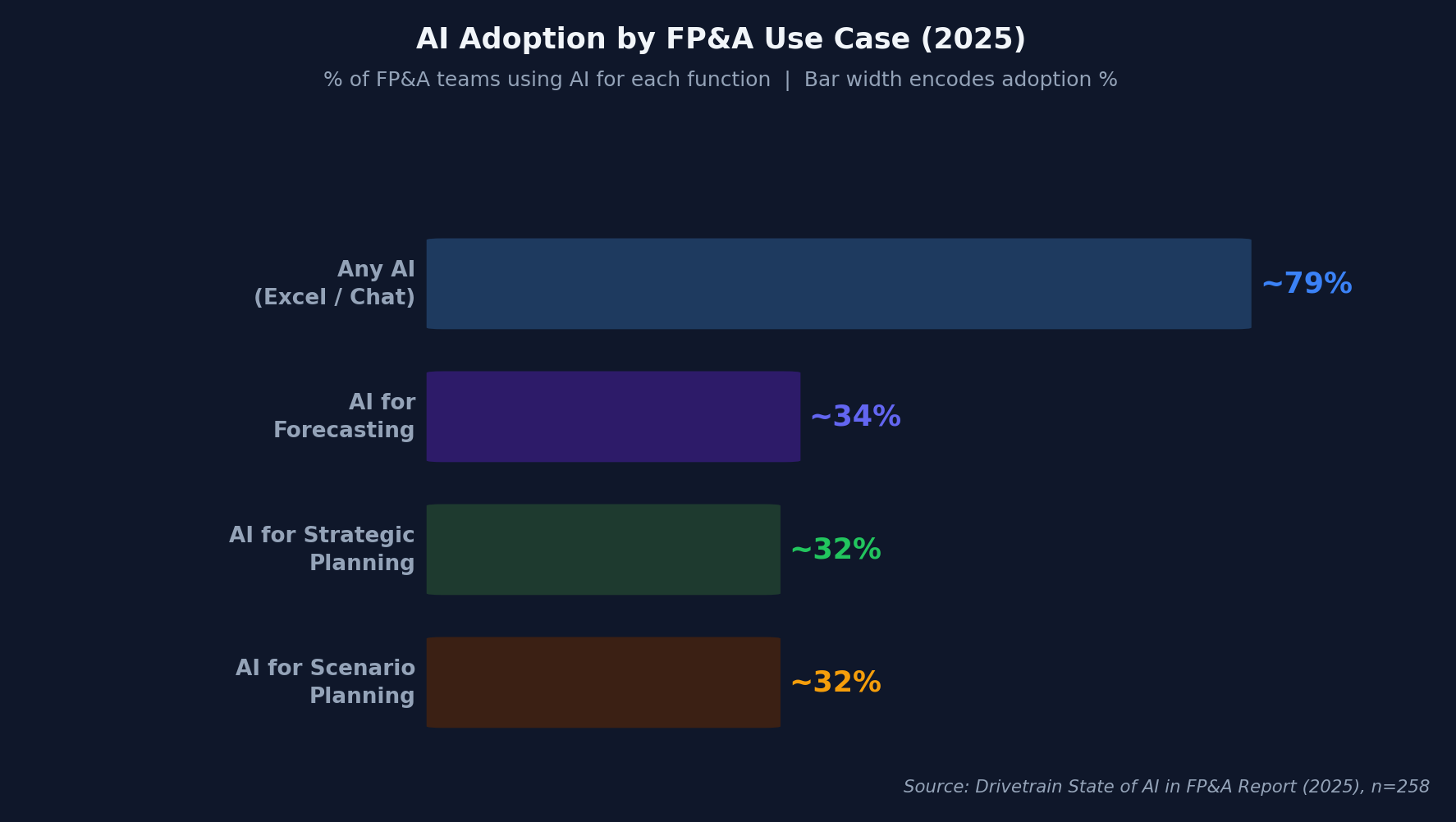
Scenario planning is the task every FP&A team knows they should do more of — and the one that gets cut first when deadlines tighten. Only 32% of FP&A teams currently use AI for scenario planning, even though 79% have adopted some form of AI (Drivetrain, 2025). The gap isn't about willingness — it's about workflow friction.
Traditional scenario planning takes weeks. You build three models manually, cross-check assumptions across each, reconcile formulas, and present results that are already stale by the time they reach the board. AI compresses this cycle from weeks to hours — not by replacing your judgment, but by eliminating the mechanical grunt work that consumes 80% of the effort.
This guide walks through the exact process for automating base, upside, and downside scenario models using AI tools available today. If you're new to AI in finance, start with our complete guide to AI in FP&A for the full picture.
|
TL;DR AI reduces scenario planning cycle time from weeks to hours by automating assumption generation, sensitivity analysis, and model construction. Only 32% of FP&A teams use AI for this per Drivetrain's 2025 survey — meaning early adopters gain a genuine competitive advantage in board-ready scenario speed. |
Why Is Traditional Scenario Planning So Slow?
FP&A teams spend 46% of their time on data collection and validation alone, leaving barely enough capacity for the analysis and insight generation that actually drives decisions (FP&A Trends, 2024). Scenario planning compounds this problem because every scenario multiplies the data prep workload — three scenarios means three times the formula checking, three times the assumption validation, three times the reconciliation.
!Finance team reviewing charts and data on multiple monitors in a modern office setting
Here's where the time actually goes in a typical three-scenario planning exercise:
|
Activity |
% of Total Time |
Could AI help? |
|---|---|---|
|
Data collection and cleaning |
30% |
Yes — automated ETL and validation |
|
Assumption research and setting |
20% |
Yes — AI-generated assumption ranges |
|
Model construction and formulas |
25% |
Yes — AI builds linked models |
|
Cross-scenario reconciliation |
15% |
Yes — AI checks consistency |
|
Insight generation and narrative |
10% |
Partially — human judgment still needed |
The 90% of time spent on the first four activities is largely mechanical. It requires accuracy, not creativity. That's exactly the kind of work AI handles well — and it's why the cycle-time compression from AI isn't marginal. It's a step change.
Citation: According to an FP&A Trends survey, finance teams spend 46% of their time on data collection and validation, leaving only a fraction for the strategic analysis that drives business decisions — a structural bottleneck that AI scenario automation directly addresses by compressing data preparation from days to minutes (FP&A Trends, 2024).
What Does AI-Powered Scenario Planning Look Like?
AI-driven forecasting reduces prediction errors by 20-50% compared to traditional methods (McKinsey, 2022). When applied to scenario planning specifically, the accuracy improvement combines with speed to create a fundamentally different workflow.
Here's the shift:
Traditional workflow:
-
Finance analyst manually builds base case in Excel (2-3 days)
-
Copies the model, manually adjusts 15-30 assumptions for upside (1 day)
-
Copies again, adjusts assumptions for downside (1 day)
-
Reconciles all three models for consistency (1 day)
-
Builds comparison charts and narrative (1 day)
-
Total: 6-8 business days
AI-automated workflow:
-
Feed historical data and current actuals to AI (15 minutes)
-
AI generates assumption ranges for base/upside/downside with source citations (30 minutes)
-
AI builds linked three-statement models for each scenario (1-2 hours)
-
AI runs sensitivity analysis and flags inconsistencies automatically (30 minutes)
-
Human reviews, adjusts strategic assumptions, adds judgment overlay (2-3 hours)
-
Total: 4-6 hours
That's not a 20% improvement. It's a 10x compression. And the human effort shifts entirely from mechanical model construction to strategic judgment — which is what the CFO is actually paying for.
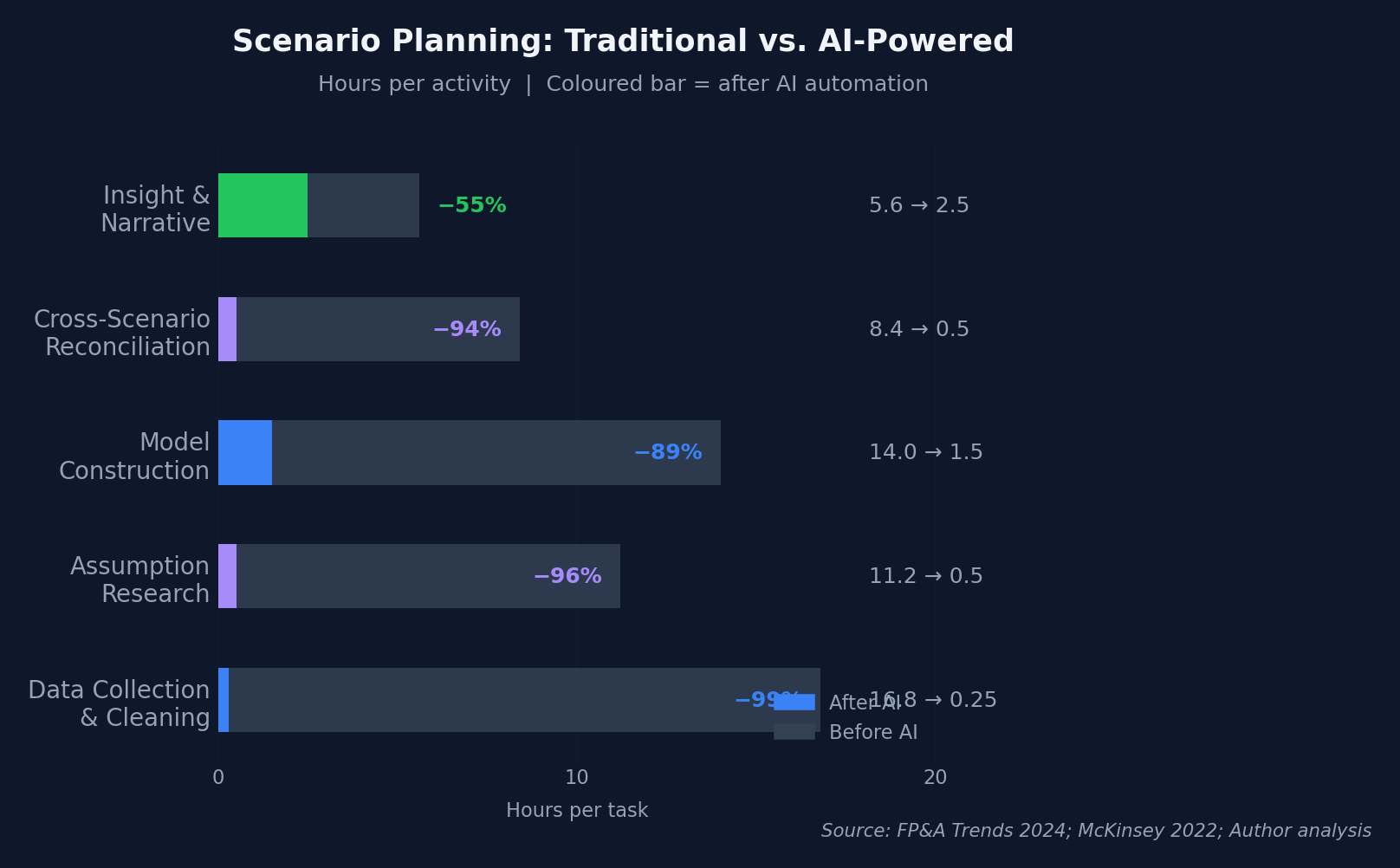
|
Contrarian take The real value of AI scenario planning isn't speed — it's volume. When building three scenarios takes a week, teams build exactly three. When it takes hours, teams can build ten. That shift from "three standard scenarios" to "ten targeted scenarios" changes how boards think about risk. It moves the conversation from "what's our downside?" to "which specific risks should we hedge?" |
How Do You Set Up AI-Automated Scenario Planning? Step by Step
The AFP's 2026 benchmarking survey of 332 finance practitioners found only 38% of teams use structured scenario planning — but those who do complete budgets 11% faster (8.1 vs. 9.2 weeks) and report 14% higher strategic alignment (AFP, 2026). That's the gap AI closes. Here's the implementation playbook.
Step 1: Define Your Scenario Framework
Before touching any AI tool, decide what you're testing. Most CFOs want three to five scenarios, but the structure matters more than the count:
- Base case: Current trajectory with existing assumptions held constant
- Upside case: Best realistic outcome — not fantasy, but achievable with favorable conditions
- Downside case: Stress scenario — what happens if two or three risks materialize simultaneously
- Black swan case (optional): Extreme but plausible disruption — pandemic, major customer loss, regulatory change
- Strategic pivot case (optional): What if we invest aggressively in [specific initiative]?
Define the key drivers for each scenario — typically 8-15 variables that move the needle. Revenue growth rate, customer acquisition cost, churn rate, gross margin, headcount growth, and capex are common starting points.
Step 2: Feed Historical Data to AI
Load your actuals into your AI tool of choice. Claude's 1-million-token context window can handle 36+ months of monthly P&L, balance sheet, and cash flow data in a single session (Anthropic, 2025). What to include:
- 36 months of monthly actuals (minimum 24)
- Current year budget with original assumptions documented
- Key driver data: bookings pipeline, headcount plan, contract renewal schedule
- External benchmarks: industry growth rates, competitor margins, market indices
The more context you provide, the more realistic the AI-generated assumptions will be. Don't just feed numbers — include the narrative around key variances. AI uses that context to calibrate its assumptions.
Step 3: Generate Assumption Ranges
This is where AI saves the most time. Instead of manually researching and setting 15-30 assumption values for each scenario, prompt the AI to generate ranges:
Example prompt:
*"Based on our 36-month actuals (uploaded), generate base, upside, and downside assumptions for the following drivers: revenue growth rate, gross margin, customer churn, sales headcount, and capex as % of revenue. For each, provide the assumption value, the rationale, and one supporting data point from public market benchmarks."*
The AI returns a structured assumption table with sourced reasoning. You review and adjust — but you're editing, not creating from scratch. That's the difference between 4 hours and 4 days.
Step 4: Build Linked Scenario Models
Once assumptions are approved, AI generates the linked financial models:
- Three-statement models (P&L, balance sheet, cash flow) for each scenario
- Automatic formula linking — changes in one assumption cascade correctly
- Sensitivity analysis — which variables have the largest impact on net income, cash, and key ratios
- Consistency checks — balance sheet balances, cash flow ties to balance sheet changes
|
Practitioner note In my experience, the most common failure mode in AI-generated scenario models isn't formula errors — it's assumption inconsistency. The AI might set aggressive revenue growth in the upside case but conservative hiring, creating an internally inconsistent scenario. Always review assumption sets as a package, not individually. Ask: "Do these assumptions tell a coherent story?" |
Step 5: Generate Board-Ready Output
The final step is where human judgment matters most. AI generates the charts, tables, and narrative framework. You provide the strategic interpretation.
What AI produces:
- Side-by-side scenario comparison tables
- Waterfall charts showing the bridge between scenarios
- Key metric dashboards (revenue, EBITDA, cash, headcount) across scenarios
- Draft narrative explaining scenario drivers and implications
What you add:
- Strategic recommendations for each scenario
- Probability-weighted expected outcomes
- Specific risk mitigation actions for downside scenarios
- Board-level framing of the "so what"
Not sure which AI assistant to use for this workflow? See our ChatGPT vs Claude for FP&A comparison — we tested both on real scenario modeling tasks.
Which AI Tools Work Best for Scenario Planning?
NVIDIA's 2026 survey found 89% of financial services firms reported AI improved both revenue and costs simultaneously (NVIDIA, 2026). For scenario planning specifically, tool selection depends on whether you need a general-purpose AI assistant or a purpose-built planning platform.
General-Purpose AI Assistants:
|
Tool |
Scenario Planning Strength |
Limitation |
|---|---|---|
|
Claude |
Best financial reasoning, largest context window (1M tokens), catches assumption inconsistencies |
Some advanced spreadsheet features still remain limited |
|
ChatGPT |
Best for Python-based Monte Carlo simulations and custom visualizations |
Model quality depends heavily on prompt structure and validation |
|
Gemini |
Largest context window (1M+), good for loading massive datasets |
Least tested on financial modeling benchmarks; best results depend on the exact workflow and governance setup |
Purpose-Built Planning Platforms:
|
Platform |
Scenario Capability |
Best For |
|---|---|---|
|
Pigment |
Native multi-scenario modeling with AI-generated assumptions |
Mid-market teams wanting integrated planning |
|
Anaplan |
Hyperblock-based scenario branching at scale |
Enterprise with complex multi-entity scenarios |
|
Planful |
Structured scenario comparison with consolidation |
Teams needing scenarios + close management |
|
Our finding The most effective scenario planning setups we've seen combine a general-purpose AI assistant for assumption generation and narrative drafting with a purpose-built platform for model construction and collaboration. Claude generates the assumption ranges and board narrative; Pigment or Anaplan hosts the structured model that multiple team members can access and update. |
Citation: According to Protiviti's 2025 Global Finance Trends Survey, 72% of finance leaders now use AI tools — up from 34% the prior year — yet scenario planning remains one of the lowest-adoption use cases, representing a major untapped opportunity for teams willing to automate assumption generation and model construction ([Protiviti](https://www.protiviti.com/us-en/survey/global-finance-trends-survey), 2025).
For a deeper look at which platforms handle scenario modeling best, see our breakdown of the best AI tools for FP&A teams in 2026.
What Are the Most Common Scenario Planning Mistakes to Avoid?
L.E.K. Consulting's 2025 survey found only 11% of CFOs currently use AI within their finance functions, while 35% are running pilots and another 44% plan to adopt within 3-5 years (L.E.K. Consulting, 2025). That means most teams are still early in the learning curve — and early adopters tend to make the same handful of mistakes. Here's what to watch for.
- Treating scenarios as independent models. This is the single most common failure. The AI generates upside assumptions for revenue but doesn't adjust hiring, capex, or working capital to match. Each scenario should tell an internally consistent story. If revenue grows 30% in your upside case, headcount and infrastructure costs need to reflect that growth — not stay flat from the base case.
- Over-relying on AI output without a judgment overlay. AI is excellent at generating assumption ranges and building model mechanics. It's poor at incorporating soft signals — a key customer's body language in the last QBR, the CEO's appetite for risk this quarter, the board's patience for investment. Does your scenario set reflect what the CFO actually believes is possible? If you're just rubber-stamping what the AI generates, you've automated the wrong part.
- Building too many scenarios without decision triggers. AI makes it tempting to build ten scenarios. But volume without actionability is noise. Every scenario should map to a specific decision: "If revenue drops below X, we freeze hiring." "If pipeline exceeds Y, we accelerate the product launch." Scenarios without triggers are academic exercises.
- Ignoring second-order effects. AI models assumptions linearly by default. It'll cut revenue in the downside case but forget that lower revenue means slower collections, tighter cash, and potentially tripped debt covenants. Always review AI scenarios for cascading effects — hiring lags, contract renewal timing, working capital swings.
- Not linking scenarios to board-level decisions. Deloitte's Q4 2025 CFO Signals survey found 54% of CFOs identified integrating AI agents as a transformation priority (Deloitte, 2025). Boards are paying attention to AI-driven planning. But they don't want to see ten spreadsheets — they want to see three scenarios tied to three strategic questions with clear recommendations for each.
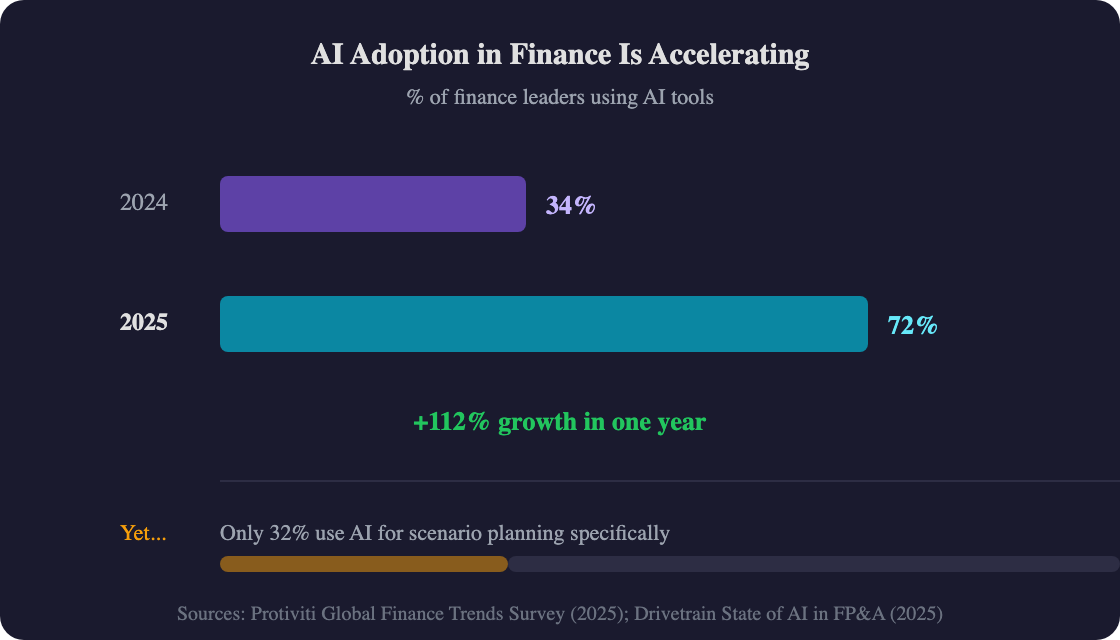
Citation: Despite AI tool adoption among finance leaders surging from 34% to 72% in a single year per Protiviti's 2025 Global Finance Trends Survey, scenario planning remains one of the lowest-adoption use cases — only 11% of CFOs currently use AI in their finance functions per L.E.K. Consulting, though 35% are actively piloting ([Protiviti](https://www.protiviti.com/us-en/survey/global-finance-trends-survey), 2025; [L.E.K.](https://www.lek.com/insights/hea/us/ei/lek-consultings-2025-office-cfo-survey-study-ai-ocfo), 2025).
Frequently Asked Questions
How many scenarios should FP&A teams build?
Most CFOs want three: base, upside, and downside. But AI makes it practical to build five to ten targeted scenarios. The additional scenarios might test specific risks — losing a top customer, a tariff change, a delayed product launch. Wolters Kluwer's 2026 survey of 1,672 finance leaders found roughly 60% expect major transformation in FP&A and scenario planning within three years (Wolters Kluwer, 2026) — teams that automate now will be ahead of the curve when that shift arrives.
Can AI generate realistic financial assumptions?
Yes — when given sufficient historical context. AI generates assumption ranges by analyzing your 24-36 months of actuals, identifying trends, and cross-referencing industry benchmarks. The output isn't perfect, but it's a better starting point than a blank spreadsheet. AI-driven forecasting reduces prediction errors by 20-50% compared to traditional methods (McKinsey), and the same accuracy advantage applies to scenario assumption setting.
How do I validate AI-generated scenario models?
Three checks. First, verify the balance sheet balances in every scenario — if assets don't equal liabilities plus equity, the model has a structural error. Second, check that cash flow ties to the balance sheet change in cash. Third — the one most teams miss — verify that assumptions are internally consistent across each scenario. Aggressive revenue growth with flat headcount is usually a sign that the AI treated assumptions independently rather than as a coherent package.
Should I use Claude or ChatGPT for scenario planning?
Claude for assumption generation, narrative drafting, and financial reasoning — its 1-million-token context window handles full financial packages without losing context. ChatGPT for statistical modeling, Monte Carlo simulations, and Python-based sensitivity analysis via Code Interpreter. Wall Street Prep's 2026 benchmark scored Claude 5.5/10 vs. ChatGPT 2.5/10 on financial modeling (Wall Street Prep, 2026).
How often should AI scenarios be refreshed?
Monthly at minimum, weekly if your business has high volatility. The advantage of AI-automated scenarios is that refreshing takes hours, not days — so you can update after every major data point (earnings, pipeline changes, macro events) rather than waiting for the quarterly planning cycle. Top-performing FP&A teams generate forecasts significantly faster than peers (Drivetrain, 2025). For a deeper dive on the forecasting side specifically, see our step-by-step AI financial forecasting playbook.
What to Do Next: Automate Your First Scenario This Month
Scenario planning is one of the highest-value, lowest-adoption AI use cases in FP&A. Only 32% of teams automate it today — even as 87% of CFOs rate AI as extremely or very important to their finance operations (Deloitte Q4 2025 CFO Signals, 2025). The tools are available and affordable. The question isn't whether to start — it's how fast you can move.
Key takeaways:
-
10x speed compression: AI reduces scenario planning from 6-8 days to 4-6 hours by automating data prep, assumption generation, and model construction
-
Volume over speed: The real advantage isn't building three scenarios faster — it's building ten scenarios, testing specific risks the board cares about
-
Start with assumptions: The highest-ROI entry point is AI-generated assumption ranges for your existing models — no platform migration required
-
Combine tools: Use Claude for financial reasoning and narrative, ChatGPT for statistical modeling, and a platform (Pigment/Anaplan) for structured collaboration
-
Human judgment stays central: AI handles the mechanical 90%. Your team's strategic overlay is the 10% that makes scenarios actionable
The teams not yet using AI for scenarios are spending days on work that takes hours. That's not just a productivity gap — it's a decision-quality gap. Teams that model more scenarios make better-informed bets. Ready to go deeper? Our complete guide to AI in FP&A covers the full landscape of what's possible.