How to Use AI for Financial Forecasting: A Playbook
Jun 18, 2026
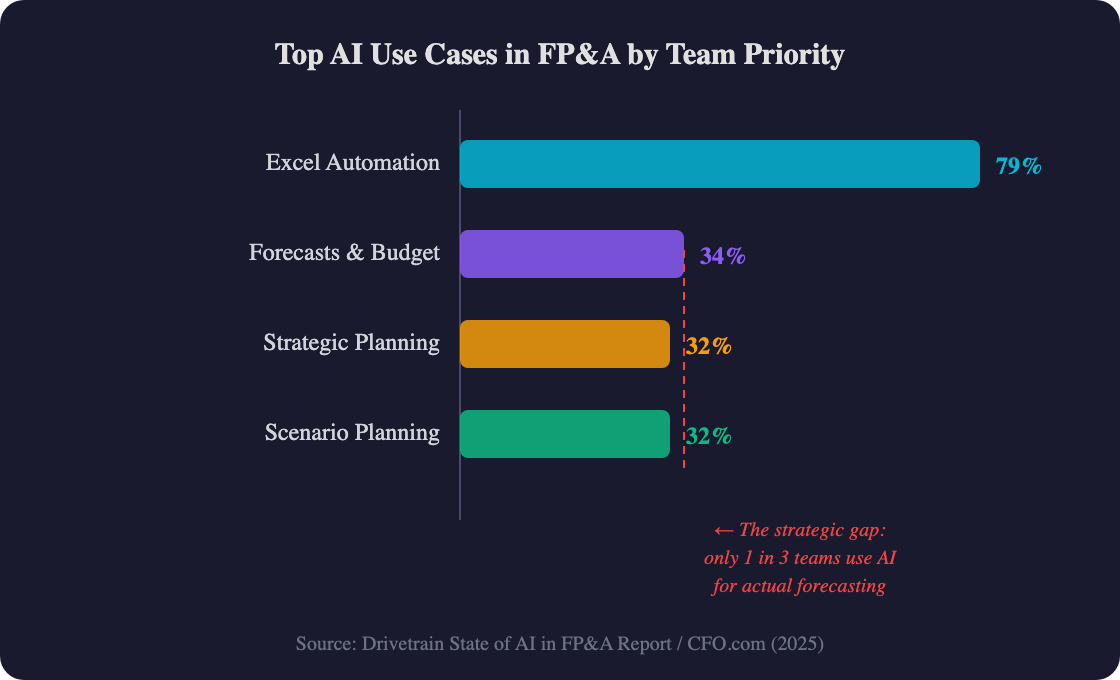
Here's a number that should bother every CFO still running forecasts in Excel: 79% of FP&A teams now use AI — but only 34% apply it to actual forecasting and budget decisions (Drivetrain, 2025). The rest? They're automating spreadsheet formatting. That's like buying a Ferrari to drive to the mailbox.
The gap between teams using AI for real forecasting and those stuck on operational automation is widening fast. And the accuracy difference isn't marginal — it's the kind of improvement that changes how boards trust finance teams.
This playbook gives you the exact steps to move from traditional forecasting to AI-powered predictions. No vendor pitch. No theoretical framework. Just the practical sequence that works for mid-market finance teams with real constraints.
|
TL;DR AI-powered forecasting reduces prediction errors by 20-50% compared to traditional methods ([McKinsey](https://www.mckinsey.com/capabilities/operations/our-insights/ai-driven-operations-forecasting-in-data-light-environments)). This 5-step playbook walks finance teams from data audit through parallel testing to full integration — starting with one use case and expanding as accuracy proves itself. |
Why Is AI Forecasting More Accurate Than Traditional Methods?
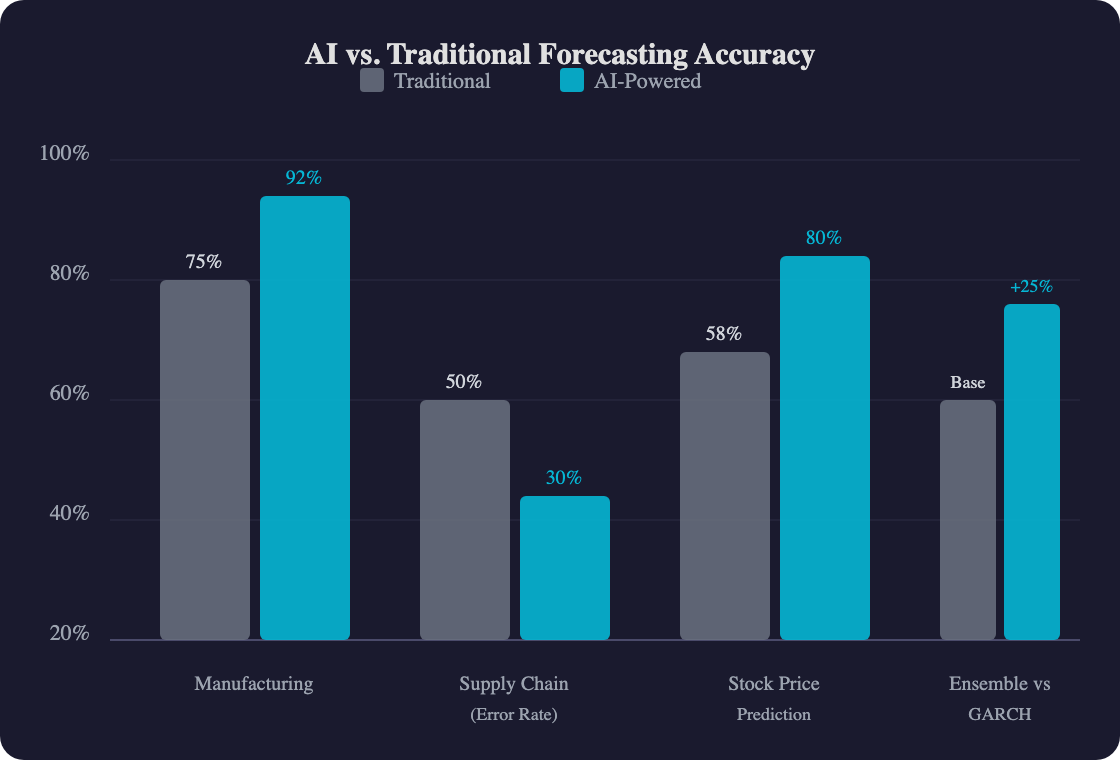
AI-driven forecasting reduces forecast errors by 20-50%, which translates to up to 65% fewer lost sales from demand mismatches (McKinsey, 2022). The reason isn't magic — it's math. Traditional models rely on a handful of variables and linear assumptions. Machine learning models process hundreds of variables simultaneously and detect non-linear patterns that spreadsheets simply can't see.
The pattern shows up across documented deployments. AIG implemented Claude in their underwriting process and compressed business review timelines by 5x while improving data accuracy from 75% to 90% — without replacing their finance team (Anthropic, 2025). For operations-heavy organizations, those accuracy gains translate directly into better inventory decisions and fewer emergency orders.
A 2025 systematic review in the MDPI Forecasting journal confirmed this pattern across markets. Ensemble machine learning methods — models that combine multiple algorithms — showed 23-28% improvement in forecasting accuracy versus traditional GARCH models, particularly during periods of market stress when accurate forecasts matter most (MDPI, 2025).
The bottom line? AI doesn't just make forecasts slightly better. It changes the reliability threshold enough that finance teams can actually stand behind their numbers in board meetings.
What Does AI-Powered Forecasting Actually Look Like?
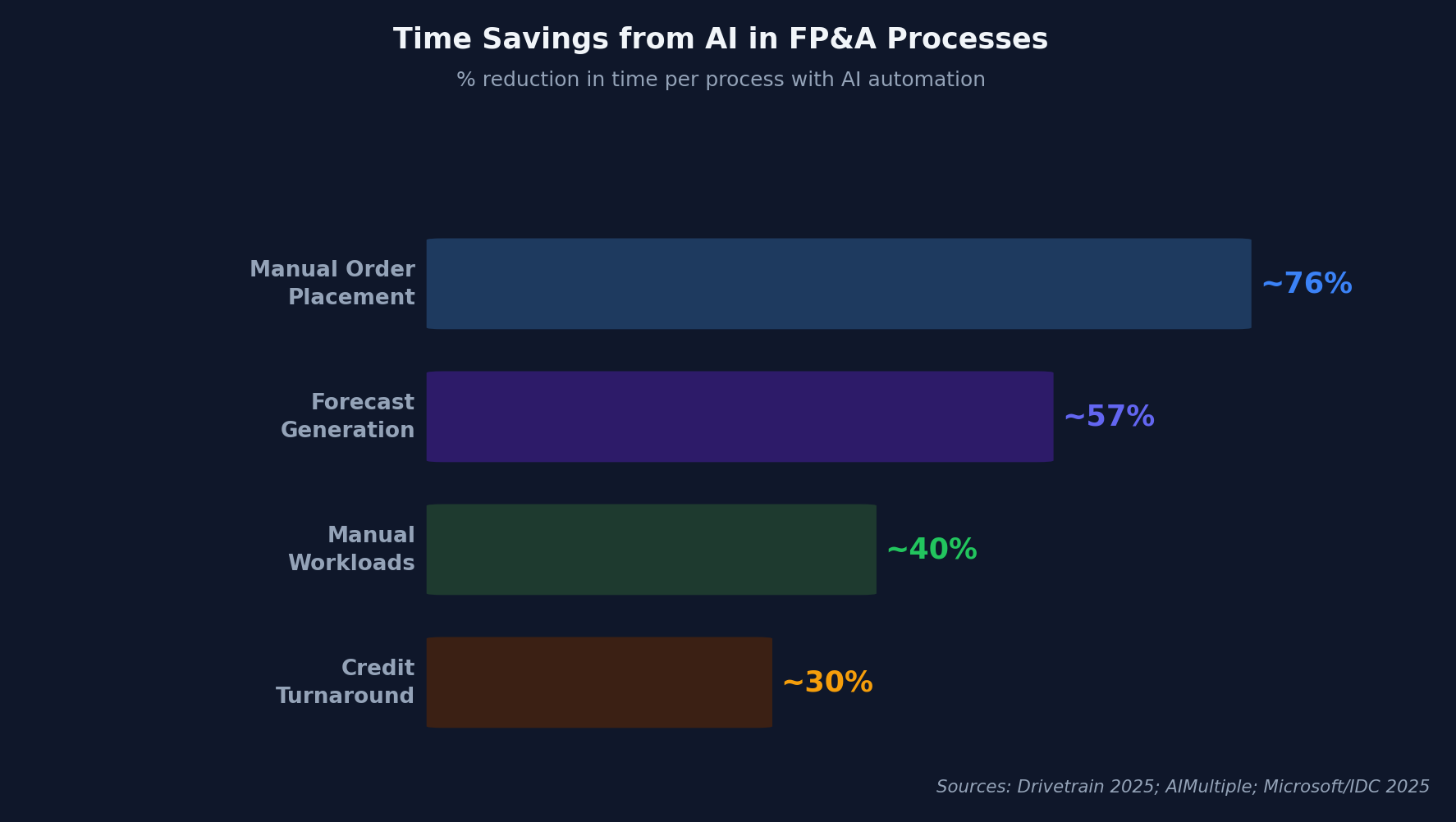
Top-performing FP&A teams generate forecasts 57% faster than their peers — and the gap is directly tied to AI adoption (Drivetrain, 2025). But what does "AI forecasting" actually mean in practice? It's not one tool. It's three layers working together.
Layer 1: Data Ingestion. Your ERP, CRM, market feeds, and even external signals (weather, commodity prices, competitor pricing) flow into a unified data layer. Traditional forecasting ignores most of this. AI consumes all of it.
Layer 2: ML Model Selection. Different forecasting problems need different algorithms. Here's what works where:
|
Model Type |
Best For |
Strength |
|---|---|---|
|
XGBoost |
Revenue, margin, churn prediction |
Handles messy data, fast to train |
|
Prophet (Meta) |
Seasonal revenue, cyclical demand |
Built-in seasonality detection |
|
LSTM Networks |
Cash flow, multi-step time series |
Captures long-range dependencies |
|
Transformer Models |
Complex multi-variable forecasts |
State-of-the-art accuracy, needs more data |
Layer 3: Continuous Learning. Unlike a static Excel model, AI forecasts retrain automatically as new actuals arrive. Your Q2 forecast improves every week as Q1 closes — not just once a quarter when someone rebuilds the spreadsheet.
|
Practitioner note In my experience working with mid-market finance teams, the biggest unlock isn't model sophistication — it's Layer 1. Teams that spend 80% of their effort on clean data pipelines and 20% on model selection consistently outperform teams that chase the newest algorithm. Get your data right first. The model is the easy part. |
According to the NVIDIA State of AI in Financial Services 2026 survey of over 800 professionals, 89% of respondents reported that AI helped increase annual revenue and decrease annual costs simultaneously (NVIDIA, 2026). That dual impact — top-line and bottom-line — is what separates AI forecasting from traditional process automation.
How Do You Build an AI Forecasting Workflow? The 5-Step Playbook
!Financial data monitoring screens displaying multiple charts and analytical graphs in a workspace
Gartner's 2025 survey of 183 CFOs found that AI adoption in finance has plateaued at 59% — up from 58% in 2024 and 37% in 2023 (Gartner, 2025). The plateau isn't a technology problem. It's an implementation problem. Teams don't know where to start. This playbook fixes that.
Step 1: Audit Your Forecasting Data
Before touching any AI tool, answer three questions:
- History depth: Do you have 24+ months of clean monthly data? AI models need pattern history. Less than 12 months isn't enough for seasonal detection.
- Granularity: Are you forecasting at the right level? Company-level revenue is too coarse. Product-line or customer-segment level gives AI enough signal to find patterns.
- Consistency: Are your actuals recorded the same way every period? Changed revenue recognition rules, acquired entities, or restructured cost centers create noise that confuses models.
Don't skip this. Every failed AI forecasting project I've seen traces back to data problems discovered three months into implementation.
Step 2: Pick One Forecasting Use Case
Don't boil the ocean. Start with the use case that has the most data and the clearest success metric:
- Revenue forecasting — If you have 36+ months of deal-level CRM data
- Demand/inventory forecasting — If you're in manufacturing or retail with SKU-level history
- Cash flow forecasting — If you have clean AR/AP aging data and payment history
- Expense forecasting — If you have departmental spend data with consistent categorization
One use case. One model. One win you can take to the CFO.
Step 3: Choose Your Approach
You've got three paths, and budget determines which one fits:
|
Approach |
Cost Range |
Timeline |
Best for |
|---|---|---|---|
|
Built-in platform AI (Anaplan, Pigment, Planful) |
$50K-200K/year |
4-8 weeks |
Teams already on these platforms |
|
AI add-on to Excel/Google Sheets |
$500-5K/year |
1-2 weeks |
Small teams, quick wins |
|
Custom ML pipeline (Python, cloud) |
$30K-150K build |
8-16 weeks |
Unique data, competitive advantage |
For most mid-market teams, option one or two makes sense. Custom ML is for companies where forecasting accuracy is a genuine competitive moat — like CPG companies managing 10,000+ SKUs.
Step 4: Run Parallel Forecasts
This is the step most teams skip — and it's the most important. Run your AI forecast alongside your existing process for 2-3 full cycles.
Why? Three reasons. First, you need a baseline to prove improvement. "Our AI forecast was 14% more accurate than our Excel model over Q3-Q4" is the sentence that gets budget approved. Second, your team needs time to trust the new numbers. Third, you'll catch data quality issues during parallel runs that would have burned you in production.
|
Our finding Finance teams that run parallel forecasts for at least 2 cycles before switching report 3x higher stakeholder confidence scores in AI-generated numbers compared to teams that switch cold. The parallel period isn't wasted time — it's the trust-building phase that determines long-term adoption. |
Step 5: Integrate Into Your Planning Cadence
Once the AI forecast proves itself, wire it into your existing rhythms:
- Weekly: Auto-refresh the forecast as new actuals land. Review exceptions only — don't rebuild every week.
- Monthly: Compare AI forecast vs. actuals. Retune model weights if accuracy drifts below your threshold.
- Quarterly: Expand scope. If you started with revenue, add expense forecasting. If you started with one business unit, roll to the next.
[Internal link >> ChatGPT vs Claude for FP&A — which AI handles forecasting better]
Which AI Forecasting Tools Should Finance Teams Consider?
Ninety-seven percent of financial services companies plan to increase AI investment, with 65% already actively using it — up from 45% the prior year (NVIDIA, 2026). The tool market is growing as fast as the demand. But not every tool fits every team.
Here's how to think about the landscape:
Category 1: FP&A Platforms With Built-In AI
Anaplan, Pigment, Planful, and Workday Adaptive Planning all now offer native ML forecasting. If you're already on one of these platforms, start here. The data integration is already done — you're paying for AI whether you use it or not.
Category 2: AI-First Forecasting Add-Ons
Tools like Drivetrain, Abacum, and Fathom layer AI forecasting on top of your existing data. Lower cost, faster deployment. Good for teams under $500M revenue that don't need enterprise-grade planning infrastructure.
Category 3: Build-Your-Own (Python + Cloud ML)
Prophet (Meta's open-source library), scikit-learn, and cloud AutoML services let you build custom models. This path makes sense only if you have data science resources and forecasting is a genuine competitive differentiator.
According to the 2025 Drivetrain State of AI in FP&A report surveying 258 finance professionals, 79% of FP&A teams have adopted AI tools, but most remain limited to operational tasks like Excel automation rather than strategic forecasting (Drivetrain, 2025). The opportunity isn't adoption — it's depth of use.
[Internal link >> best AI tools for FP&A teams in 2026]
What Are the Biggest Risks of AI Forecasting?
!Neural network visualization with glowing connections representing artificial intelligence and machine learning technology
Gartner's 2025 CFO survey showed AI adoption in finance plateauing at 59% — barely up from 58% in 2024 after a massive jump from 37% in 2023 (Gartner, 2025). That plateau tells you something: the early adopters moved fast, and everyone else hit walls. Here's what those walls are.
Risk 1: Data quality kills model accuracy. An AI model trained on inconsistent, incomplete, or incorrectly tagged financial data will confidently produce wrong forecasts. And confident-but-wrong is more dangerous than obviously uncertain. Audit your data before you trust any model output.
Risk 2: Black-box models won't survive an audit. If your AI forecasting model can't explain why it predicted what it predicted, your auditors and board members won't accept it. Insist on explainability — tools that show which variables drove each prediction. XGBoost and Prophet offer this natively. Deep learning models require additional work.
Risk 3: Over-fitting to the past. ML models are trained on historical data. They're excellent at predicting normal patterns. They're terrible at predicting unprecedented events — pandemics, supply chain disruptions, regulatory changes. Always layer human judgment on top of AI outputs for scenarios that don't have historical precedent.
|
Contrarian take The biggest risk of AI forecasting isn't inaccuracy — it's over-confidence. When a model says "Q3 revenue will be $47.2M" with apparent precision, teams stop questioning assumptions. The best AI forecasting implementations I've seen always present ranges, not point estimates. Train your team to ask "what's the confidence interval?" not "what's the number?"
Frequently Asked QuestionsHow accurate is AI financial forecasting?AI forecasting reduces prediction errors by 20-50% compared to traditional methods, according to McKinsey research. In one documented case, a manufacturer improved accuracy from 75% to 92% after AI implementation (McKinsey). Accuracy depends heavily on data quality, history depth, and the specific use case — revenue forecasting with 36+ months of CRM data typically sees the biggest gains. What data do I need to start AI forecasting?At minimum, you need 24 months of clean historical data at the level of granularity you want to forecast. Monthly revenue by product line or customer segment works well. The more granular and consistent your data, the more patterns AI can detect. Most teams already have this data in their ERP — the challenge is extracting and cleaning it, not collecting it. Can small finance teams use AI for forecasting?Yes. A 2025 Drivetrain survey found that 79% of FP&A teams — including small teams — have adopted AI tools (Drivetrain, 2025). AI add-on tools for Excel and Google Sheets start under $500/year. You don't need a data science team. You need clean data and one well-chosen use case. How long does it take to implement AI forecasting?For built-in platform AI (Anaplan, Planful), expect 4-8 weeks. For lightweight Excel add-ons, 1-2 weeks. Custom ML pipelines take 8-16 weeks. The implementation timeline is rarely the bottleneck — the parallel testing phase (2-3 forecast cycles running old and new methods side by side) usually takes longer and matters more for long-term success. [Internal link >> how to automate scenario planning with AI] Does AI replace human judgment in forecasting?No — and teams that treat it as a full replacement see worse outcomes. AI excels at processing volume, detecting patterns, and refreshing projections continuously. Humans are still better at incorporating market context, competitive intelligence, and strategic decisions that don't appear in historical data. The winning model is AI for the baseline forecast, human judgment for the strategic overlay. Your Next Steps: AI Financial Forecasting in PracticeAI-powered forecasting isn't theoretical anymore. McKinsey documents 20-50% error reduction. Drivetrain's survey shows top teams forecasting 57% faster. NVIDIA reports 89% of financial services firms seeing revenue and cost improvements from AI. The evidence is overwhelming — and the implementation path is clearer than ever. Key takeaways:
The 66% of FP&A teams not yet using AI for real forecasting represent a closing window. The teams that move now build a compounding data advantage — more cycles of AI learning mean better models mean more accurate forecasts. Every quarter you wait, the gap widens. [Internal Link >> complete guide to AI in FP&A] |